1. Opening the page and filtering
Click Main menu / Procurement / Analytics / Incoming invoice analytics to open the page. On the Search tab you can narrow the data with the Document date field pair, a part of the company name typed into the Supplier field and the Employee list, then click the Search button. When you open the page, the period from 1 January of the current year to today is shown. The Document date filters the time the invoice was recorded, not the performance date or the payment due date. There are six tabs and the filter works the same way on each of them. Note that the elements showing open payables (for example Open payables or the aging) show the current state, so the date filter does not affect them, only the Supplier and Employee filters do. The screenshots are taken from the Hungarian demo interface.
2. Overview
The top strip titled Incoming invoice volume shows the number and the value of the valid invoices for Today, This week, This month, This year and All (independent of the filter). Below it the indicators of the selected period follow, each compared with the previous period of the same length, with the percentage change:
- Incoming invoices, Gross value, Net value, VAT: the number and the value of the invoices.
- Suppliers: from how many different suppliers you received invoices; the Average document value is the gross value per invoice.
- Open payables and Overdue payables: the amount still unpaid and its part beyond the due date, with the number of invoices. These two indicators show the whole open stock, not only that of the period; the details are on the Payments tab.
Two monthly charts follow: Gross value by month and Net value and VAT by month (stacked columns). The Split by status shows the Draft, Closed, Cancellation and Cancelled invoices by number, and the Split by currency shows in which currency the invoices arrived (the value in the default currency).
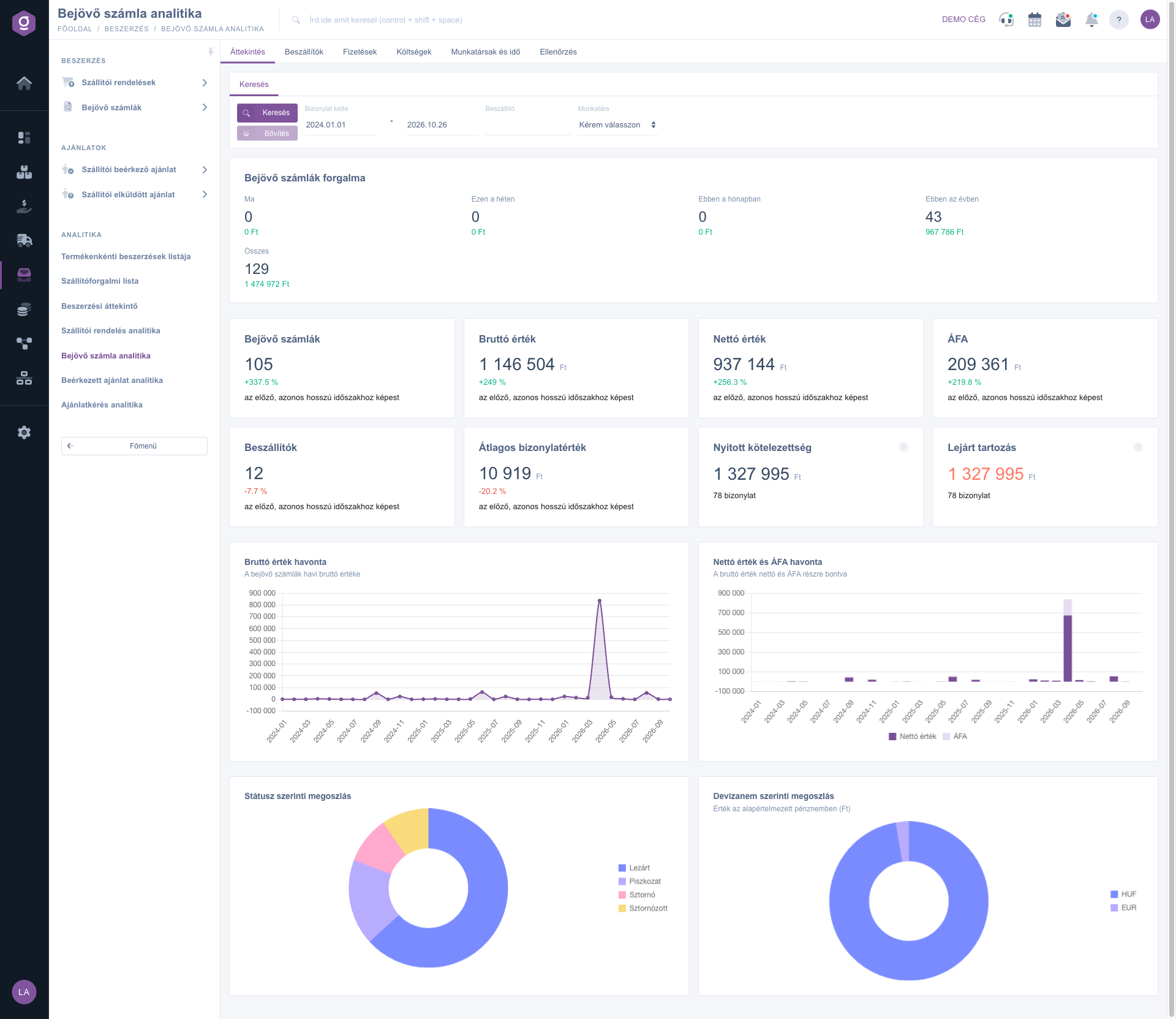
Incoming invoice analytics – Overview tab (Áttekintés)
3. Suppliers
The five indicators: Active suppliers (how many invoiced in the period), TOP3 share (the combined share of the three biggest suppliers in the value; above 60 % it turns yellow because it signals purchasing dependence), HHI concentration index, New suppliers and Inactive suppliers. The HHI is the sum of the squared supplier shares (%), between 0 and 10,000: below 1500 it is Low concentration, between 1500 and 2500 Moderate concentration, above that High concentration. A new supplier is one whose first incoming invoice falls into the period. The Top suppliers chart shows the ten biggest suppliers by value, the New and returning suppliers chart splits the invoicing suppliers by month.
The Supplier ranking table ranks by value in a Pareto style (up to 25 rows): the number, the value and the average value of the invoices, the Share, the Cumulative share and the Avg. days to pay per supplier. The Inactive suppliers table lists the suppliers that invoiced earlier but not in the last 90 days; this list does not depend on the filters. The Open balance and credit limit table shows per supplier the open and the overdue amount next to the Credit limit (payment limit) recorded on the partner; the Utilisation is the ratio of the open amount to the credit limit and appears only where the partner has a credit limit.
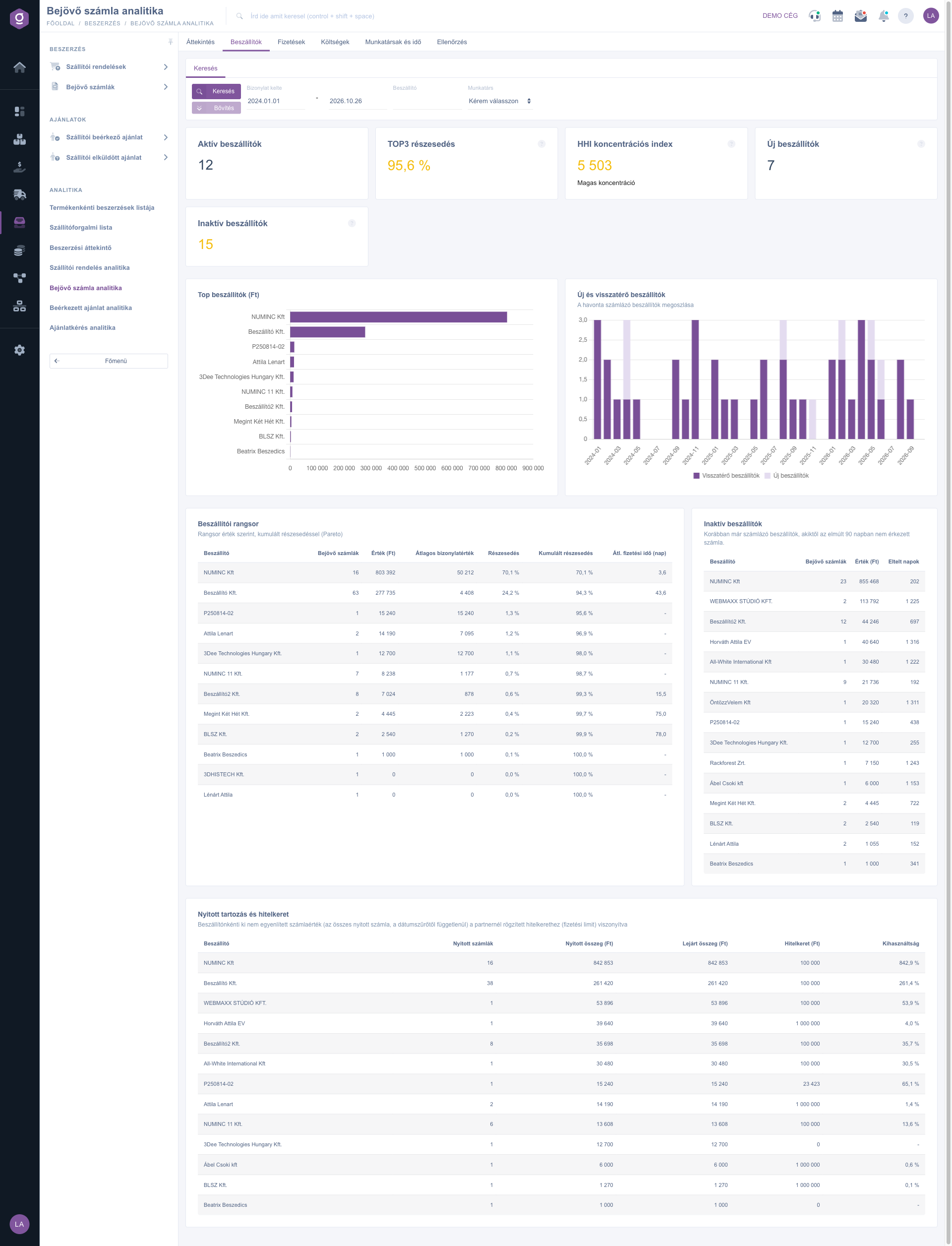
Incoming invoice analytics – Suppliers tab (Beszállítók)
4. Payments
Here you see the financial side. Five indicators are at the top: Open payables and Overdue payables (current state), the Average days to pay (DPO) (the average number of days from recording the invoice to the last payment on the fully paid invoices of the period), the Paid on time ratio (the last payment was made on the due date at the latest) and the Average delay (days), which averages only the invoices paid late. If there is no paid invoice in the period yet, a dash is shown instead.
- Payables aging: all open invoices by due date in five groups: Not yet due, 1-30 days overdue, 31-60 days overdue, 61-90 days overdue and Over 90 days overdue, in a chart and a table (number, amount, share). The more the chart leans towards the older groups, the more urgent the transfer is.
- Payment status: the invoices of the period by number as Paid, Partially paid and Unpaid.
- Due date forecast (30 days): the unpaid invoices due in the next 30 days in weekly buckets, so you can plan the cash outflow.
- Payment method split: the value of the invoices of the period by payment method.
- Oldest overdue invoices: the twenty oldest overdue invoices (the Document number is a link that opens the invoice), and the Overdue payables by supplier summary with the Max. days overdue value.
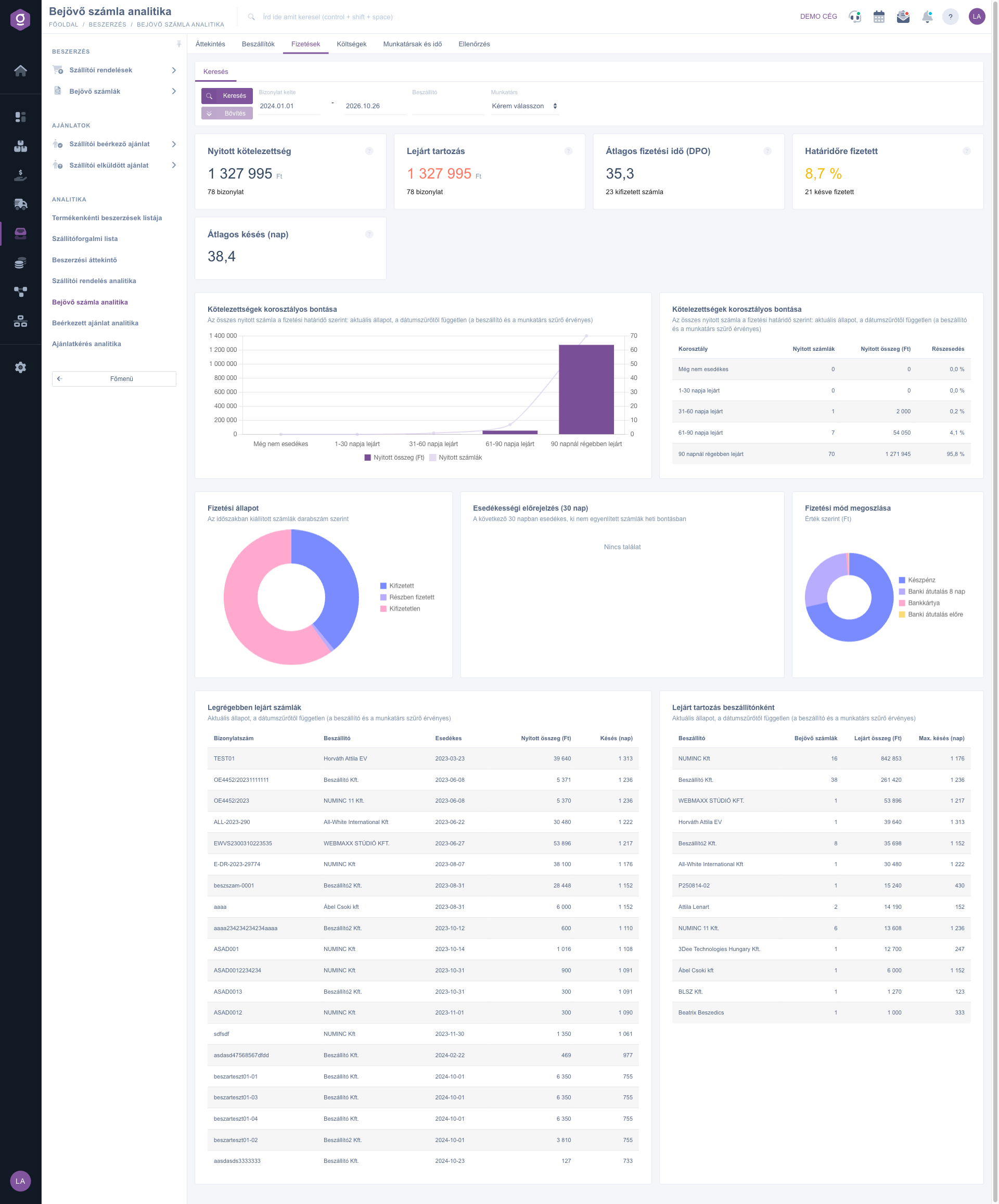
Incoming invoice analytics – Payments tab (Fizetések)
Tip
Before the weekly payment run open the Payments tab: from the first bucket of the Due date forecast (30 days) you see how much money you need in the next seven days, and the top of the Overdue payables by supplier table shows whom to pay first so that your average delay does not get worse.
5. Costs
Six indicators open the tab: Net value, VAT (with the percentage of the net value), Extraordinary cost (the sum of the extraordinary costs recorded on the invoices), Foreign currency share (the share of the invoices in a currency other than the default), Unassigned share (the share of the net value of the lines without a ledger number) and Shipping cost (the net value of the shipping cost lines).
- VAT by tax rate and Tax rates in the period: the monthly VAT amount by the tax rate of the lines, and the net value, the VAT and the share per rate. This helps you check before the VAT return how much VAT has accumulated at each rate.
- Net cost by ledger number: the net value of the lines split by the assigned ledger number; lines without a ledger number go to the Unassigned row.
- Product category split (net): it counts only the product lines; a product without a category is shown as Uncategorized.
- Split by job number and Split by department: the net value of the invoices by internal cost centre; where none is given, it goes to the Unknown row.
- Currency exposure: per currency the number of invoices, the amount in the original currency and in the default currency, the type (Foreign currency or Default currency) and the share.
- Goods and shipping/service lines: the lines split into three types: Goods (products), Shipping cost and Other lines (for example a service), with the number of lines, the net value and the share.
- Purchase price change monitor: it compares the invoiced unit price with the average purchase price of the product. The Change shows the deviation in percent, the Extra cost as quantity × (invoiced price – average purchase price); a positive number means a price increase. Up to 15 products are listed, with the largest absolute extra cost, and only products whose average purchase price is known appear.
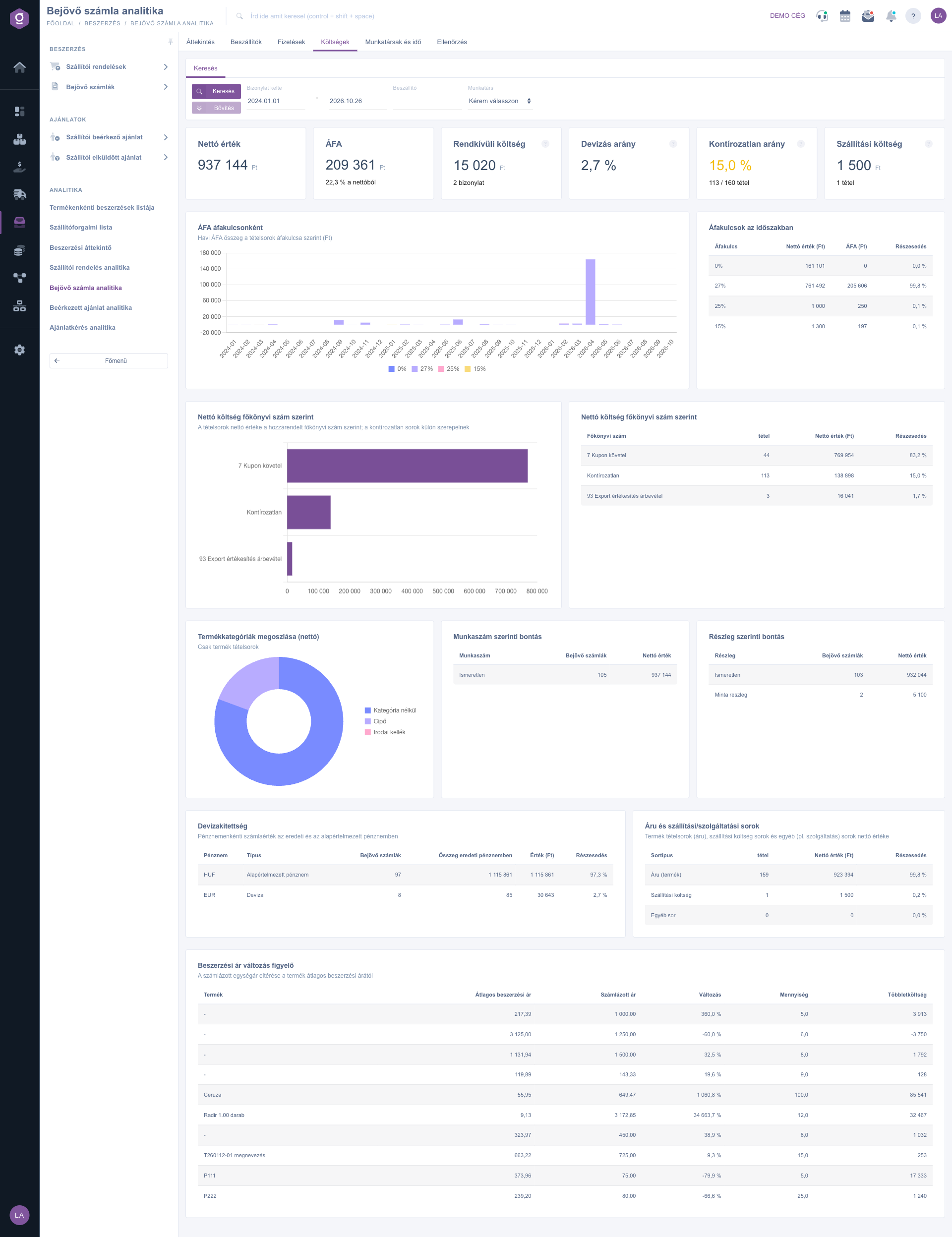
Incoming invoice analytics – Costs tab (Költségek)
6. Staff and timing
Four indicators: the number and the value of the Incoming invoices, the Avg. booking latency (days) and the Booking latency, median (days) (the days between the performance date and the recording of the invoice, only on the invoices that have a performance date; the median is less sensitive to extreme values than the average), and the ratio and number of the invoices Booked after more than 30 days. The Creation time (weekday x hour) heatmap shows when the invoices are recorded, and the Booking by day of the month chart shows on which day of the month they are recorded (column: number, line: value). A peak at the end of the month points to batch, late booking. The Colleagues chart and table give the number, the value and the average value of the invoices per colleague.
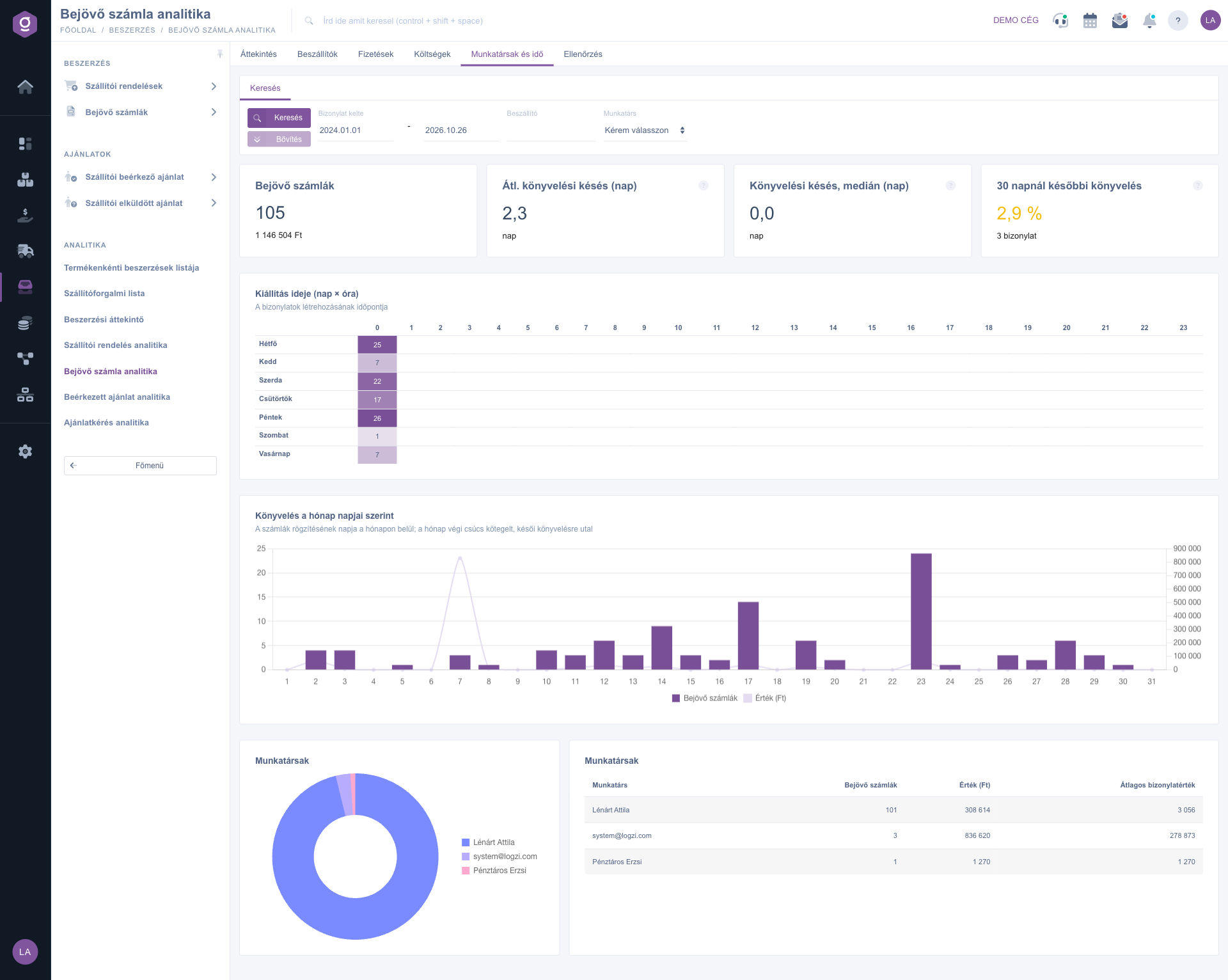
Incoming invoice analytics – Staff and timing tab (Munkatársak és idő)
7. Audit
This tab is for catching booking errors and gaps. Eight indicators are at the top (green if all is well, yellow or red if there is a problem):
- Duplicate suspects: the number of invoices for which the same supplier already has an earlier invoice with the same invoice number, or with the same amount on the same day. It is only a suspicion, not proof.
- Not linked to order / receipt: the share of invoices not linked to any purchase order, incoming delivery note or goods receipt (3-way match gap).
- Invoices differing from the order: the number of invoices that differ by more than 1 % from the gross value of the linked supplier order; it counts only where an order link exists.
- Late booking: the number and the share of the invoices recorded more than 30 days after the performance date.
- Foreign currency without exchange rate: foreign currency invoices without an exchange rate; their value cannot be converted to the default currency, so they are missing from the totals. Add the exchange rate on the invoice.
- Lines without ledger number: the share and number of lines without a ledger number.
- Storno ratio and Deleted ratio: the share of cancelled and of deleted invoices.
The detailed lists follow. In the Duplicate suspect invoices table the Reason (earlier invoice) column tells whether Same invoice number or Same amount and day caused the suspicion, and its link opens the earlier invoice. The Linked documents ratio (3-way match) chart and the Links in detail table show for what percentage of the invoices a Supplier order, an Incoming delivery note and a Goods receipt belong to the same business process. Invoices without links lists the invoices with the highest value, Invoice and order amount mismatch the largest differences (Invoice amount, Order amount, Difference, Difference (%)) and Invoices booked late those with the longest delay (Performance, Document date, Latency (days)). The Age of the drafts chart (Within 7 days, 8–30 days, Over 30 days) and the Oldest drafts list show the unfinished invoices; both are the current state, independent of the date filter.
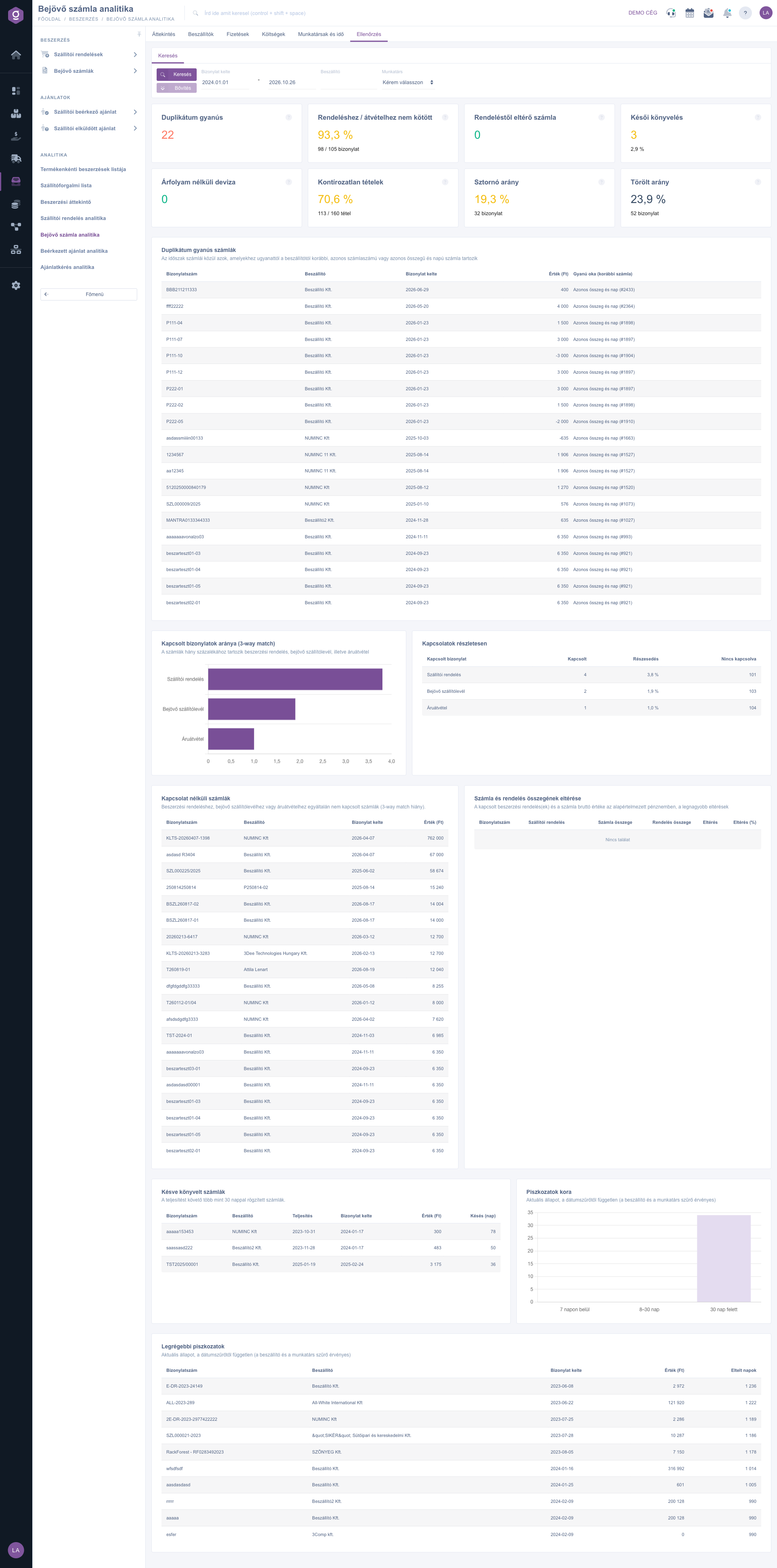
Incoming invoice analytics – Audit tab (Ellenőrzés)
Tip
Before the month-end closing open the Audit tab with the period of the previous month: first go through the Duplicate suspect invoices list, because an invoice recorded twice burdens the cost twice, then bring the share of Lines without ledger number down to zero. With the Employee filter you see at once whose records need to be reviewed.



