Warehouse management software with barcodes, real-time stock and a stock map

Logzi warehouse management software tracks every warehouse movement, from goods receipt to stock take, with barcodes and location codes. Stock lives in one system with invoicing, online shops and couriers, so you no longer have to reconcile several spreadsheets.

  • Barcode collector and PDA
  • Stock take and evaluation
  • Online shop and courier integrations
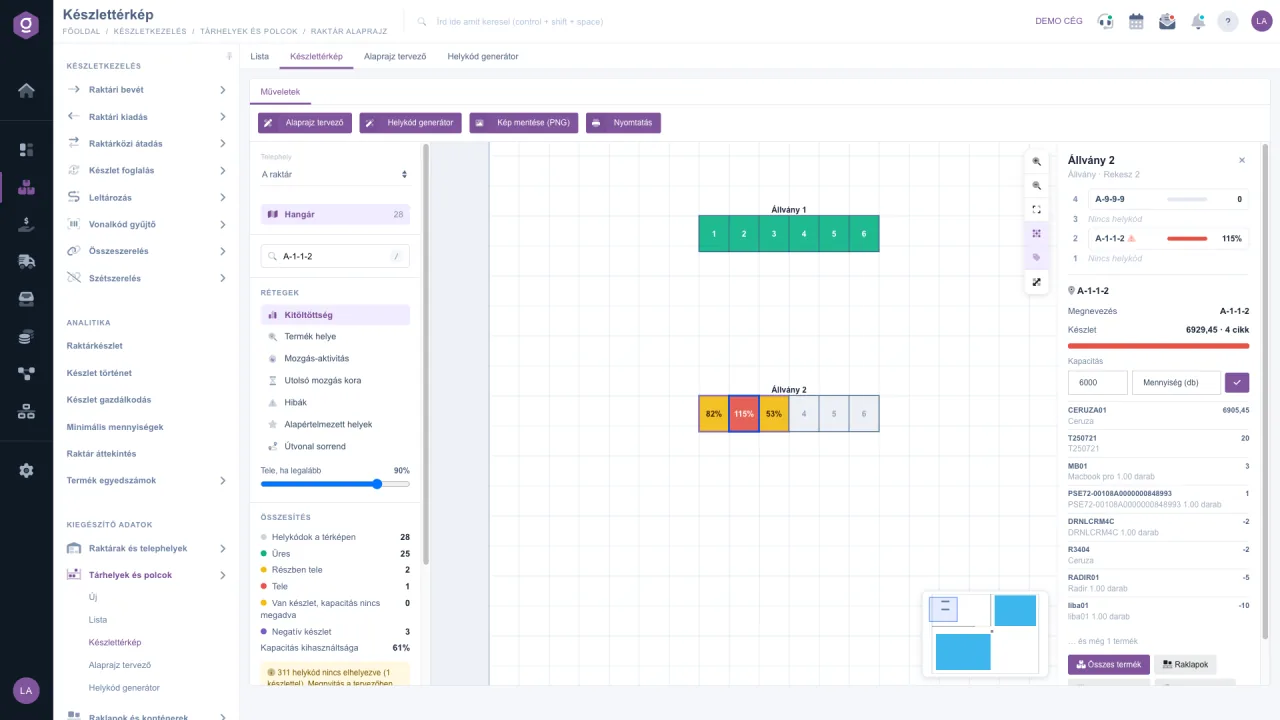
Logzi warehouse management software: stock map on the floor plan, showing fill level by location code
Barcode · location codes · real time

In short

Logzi is barcode-based warehouse management software and part of the ERP. It tracks goods receipts, issues, transfers between warehouses and stock takes, and knows where the goods are from their location codes (rack, bin, level). The stock map shows the fill level on the floor plan, the PDA Picklist guides the picker by location code, and online shop orders and couriers connect through integrations.

7map layers: fill level, activity, errors, pick route order and more
5stock states on the map: empty, partly full, full, no capacity, negative
5online shop integrations: Shoprenter, UNAS, WooCommerce, Shopify, PrestaShop
10+courier integrations, for example GLS, MPL, Foxpost, Packeta and DPD
Features

Every warehouse movement in one place

Warehouse management software should not be a separate tool: goods receipts, issues, reservations and stock takes all change the same stock that invoicing and your online shop work from.

Barcode collector document

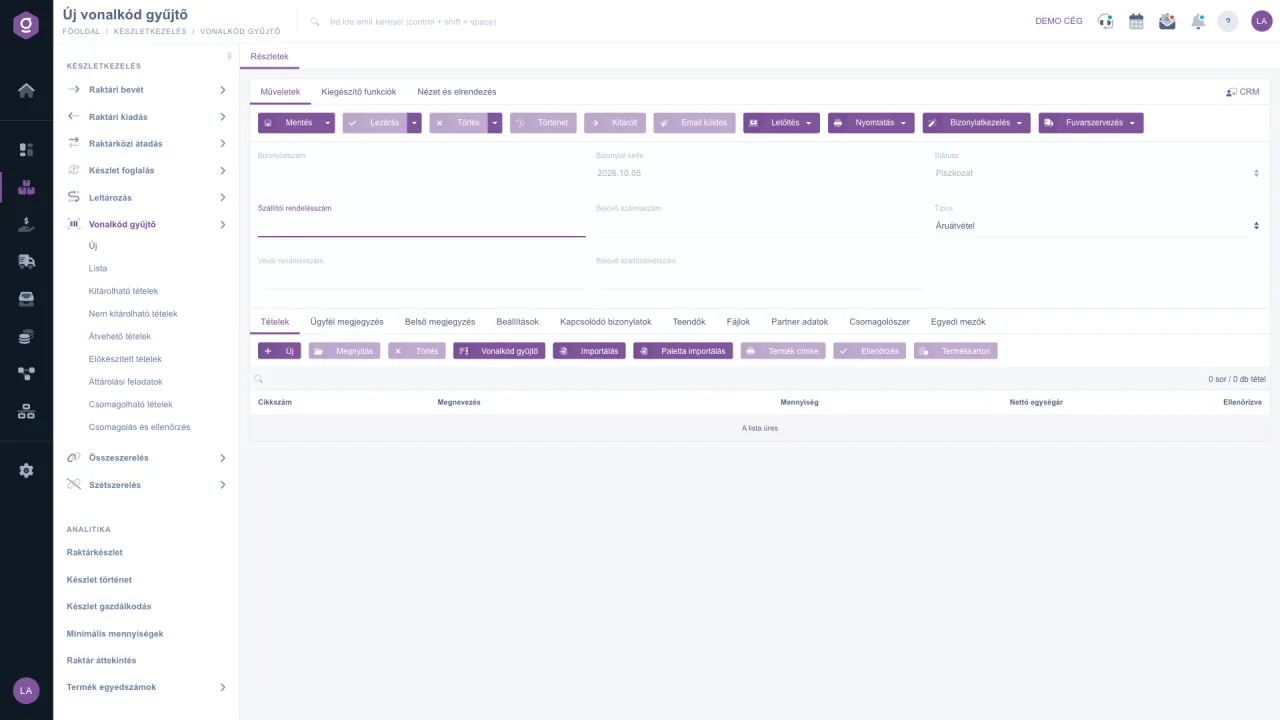
You can record items one by one, by barcode, or by CSV or pallet import. After checking and closing, the collector triggers the stock issue, and during packing the system verifies the items by barcode.

Barcode collector documentation

Location codes and stock map

In the Floor plan designer you draw your warehouse, the Location code generator creates many location codes from a template, and the Stock map shows how much stock is where.

Stock map documentation

Stock take

A stock take document per site, with automatic stock correction and evaluation.

Physical, reserved, available

The stock list shows physical, reserved and available stock separately, with location code and slow-moving stock views.

Stock list

Multiple warehouses, inter-warehouse transfer

Stock tracked per site, with bulk inter-warehouse transfers.

Inter-warehouse transfer

PDA Picklist order picking

The picker receives the pick list on a PDA, optimised by location code, and checks each pick by scanning the barcode. More accurate dispatch, fewer returns.

Picklist app

Online shop and courier in one click

Online shop orders flow into Logzi, and parcel dispatch and label printing can be done with the courier integrations. For invoicing, read about our invoicing software.

Stock map

See on the floor plan where your goods are

No need to browse lists: at a glance you see where there is free space, what is full and where the data is wrong. Switch layers and hover over the location codes.

  • Empty
  • Partly full
  • Full
  • Negative stock
  • Low
  • High
  • Very high
  • Faulty location code
Illustration with demo data: the real map shows your own floor plan and stock.
72location codes on the illustrated map
24full location codes
52%capacity utilisation (estimated)

On the real stock map you can search by location code and product, and from a selected bin you can open the products, pallets, serial numbers and stock history with one click. Stock map description

Stock take

A stock take that settles your inventory by itself

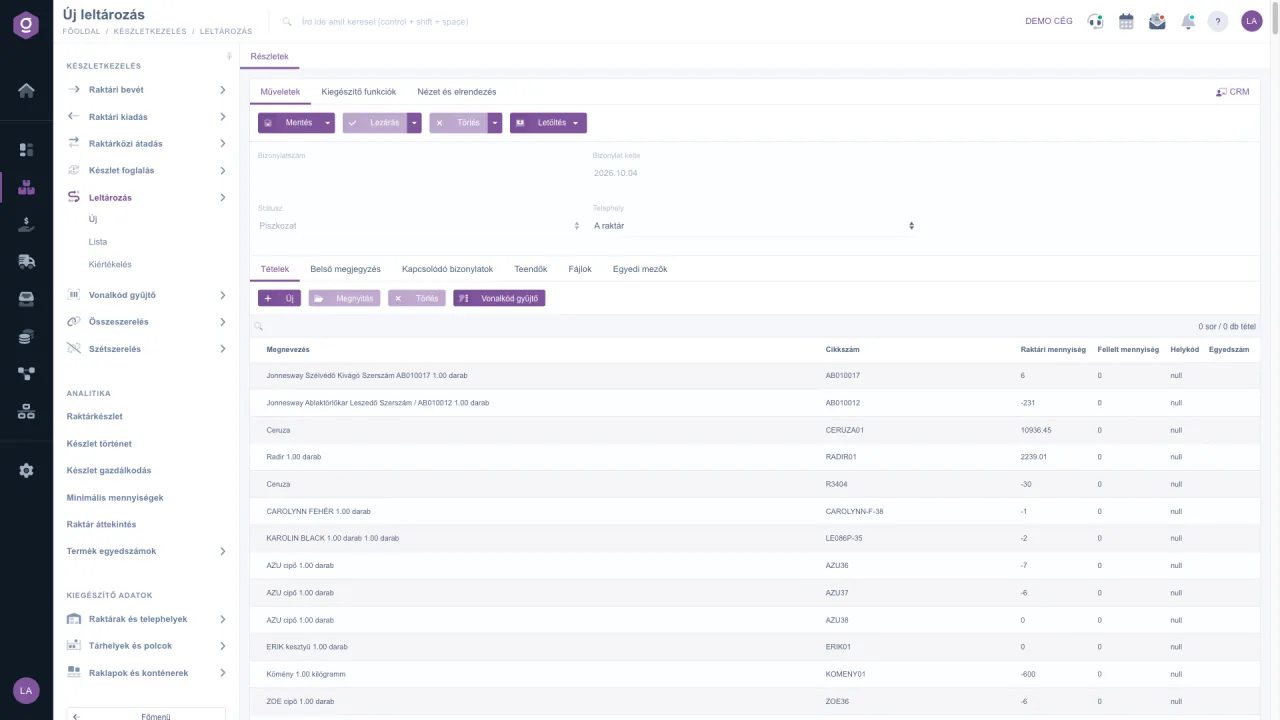
A stock take document compares the stock of one site with what you actually find on the shelves. The system fills the item list with current stock, also broken down by location code, and you add the counted quantity by hand or with a barcode collector.

On closing, it settles the surplus with a stock receipt and the shortage with a stock issue document, so the stock is set to the counted quantity. The Stock take evaluation shows the shortage, surplus, matches and the value of the discrepancy for each item.

For more on how a stock take works and what it requires, see our blog.

Stock take document documentation
Logzi stock take document: book quantity and counted quantity per item
Barcode handling

Less typing, fewer errors

You can use the barcode collector document in the same way for issues, stock takes and invoicing: you identify products by barcode and the system builds a document from the items.

During packing the system checks the items by their barcodes, flags a faulty collection, creates the parcel label and selects the courier. The overview screen also shows barcode collector movements and the daily performance of your staff.

Packing and checking
Barcode collector document in Logzi warehouse management software
Instead of Excel

Stock records in Excel or in warehouse management software?

For a small warehouse Excel may be enough, but as the number of orders and products grows it quickly becomes hard to keep track of.

Excel spreadsheetLogzi warehouse management software
Stock accuracyManual updates, versions easily get mixed upReceipt, issue and transfer documents update the stock
IdentificationManual typingBarcode collector and PDA
Where are the goods?A column in the spreadsheetLocation code, floor plan and stock map
Stock takeSeparate spreadsheet, manual correctionDocument, automatic correction and evaluation
Online shop and courierNo connectionOnline shop and courier integrations
InvoicingSeparate programIn the same system
Frequently asked questions

Warehouse management software: barcodes, stock takes, WMS and the stock map

What is the difference between warehouse management software and a WMS?

Warehouse management software is about keeping records of stock and its movements: receipt, issue, transfer and stock take. A WMS also controls the physical work in the warehouse: location codes, route-based picking and barcode checks. Logzi provides stock records and WMS-type functions (location codes, stock map, PDA order picking) in one system, together with invoicing and online shop integrations.

How does barcode inventory management work?

You identify products by barcode: on a barcode collector document you can record items one by one, by CSV or pallet import, and after checking you can issue them from stock by closing the document. During packing the system checks the items by barcode, flags a faulty collection, creates the parcel label and selects the courier. The PDA Picklist app guides the picker through the picking by location code.

How does a stock take work in Logzi?

A stock take document compares the stock of one site with what is actually found on the shelves. The system fills the item list with current stock (also by location code), and you record the counted quantity by hand or with a barcode collector. On closing, it settles the surplus with a stock receipt and the shortage with a stock issue document, and the Stock take evaluation shows the shortage, surplus and value of the discrepancy for each item.

What is a location code, and what is the stock map for?

A location code is a specific storage place in the warehouse, such as a rack, bin or level. In the Floor plan designer you draw your warehouse, the Location code generator creates many location codes from a template, and the Stock map shows on the floor plan how much stock is at each location code. The layers are: fill level, product location, movement activity, age of last movement, errors, default locations and route order.

Does it handle multiple warehouses and sites?

Yes. Warehouses and sites are managed as separate master data, stock can be tracked per site, and the Inter-warehouse transfer (also in bulk) documents the movement of goods.

What are physical, reserved and available stock?

Physical stock is what is actually in the warehouse. Reserved stock is already committed to an order or reservation, and available stock is the difference between the two: this is what you can promise to a new customer. The Stock list shows all three.

Can warehouse management be linked to an online shop and couriers?

Yes. With Shoprenter, UNAS, WooCommerce, Shopify and PrestaShop extensions, online shop orders flow into Logzi, and parcel dispatch and label printing can be done in one click with courier integrations such as GLS, MPL, Foxpost, Packeta, DPD or Express One.

How do I notice when stock is running low?

The Minimum quantities and Stock management views show which products are below the set level, and the system also makes purchase suggestions. Purchasing, supplier orders and goods receipt take place in the same system.

Get started today

Make your warehouse transparent

Sign up and try warehouse management with your own products, or request a demo and we will show you how it fits the way your warehouse works.