RMA management system and returns management from return to credit note

The Logzi RMA module takes withdrawal, return and warranty cases through one record: request, receipt, inspection, then credit note, replacement, repair or scrapping. The deadline is automatic and status changes can be looked up.

  • Automatic deadline
  • Requests from the customer portal
  • Credit note
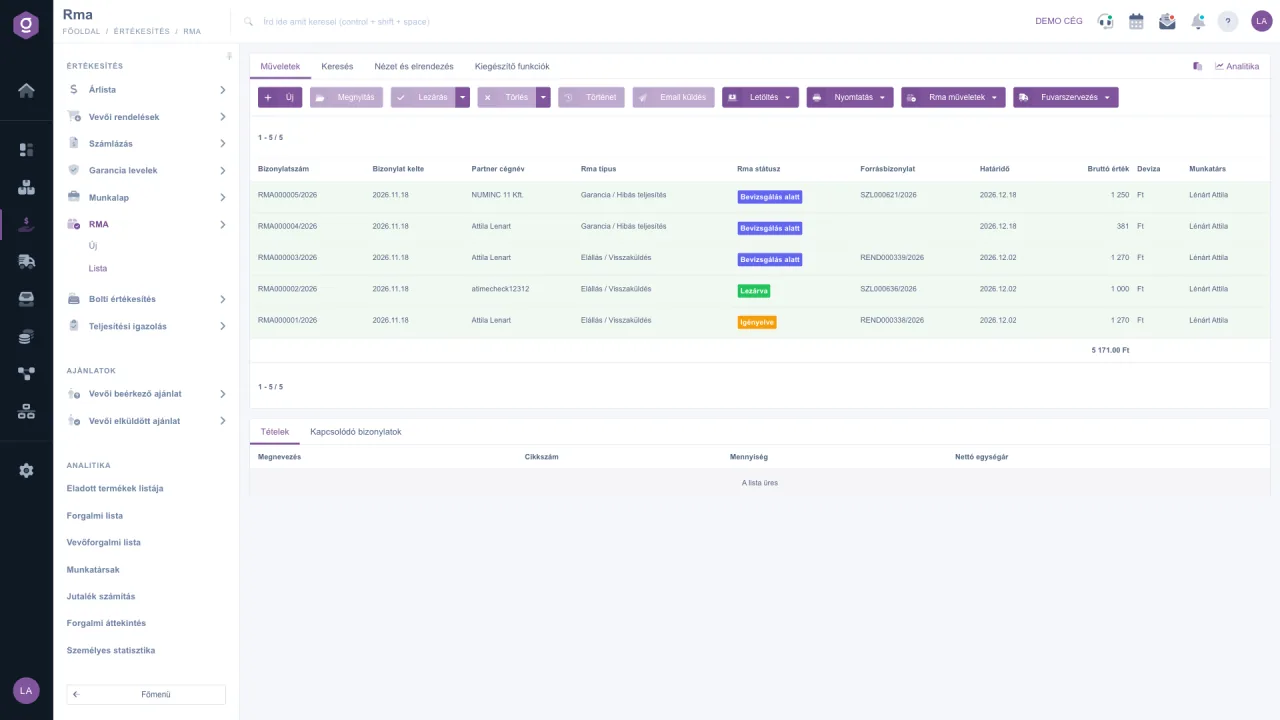
Logzi RMA management system: RMA list with statuses, types and deadlines
RMA · complaints · returns

In short

RMA (Return Merchandise Authorization) is a return authorisation: the procedure that tracks the case of returned products from request to closure. The Logzi RMA management system handles three kinds of cases (withdrawal / return, warranty / defective performance, uncollected parcel), with statuses, an automatic deadline, inspection, and a credit note, replacement, repair or scrapping that can be started from the decisions.

3RMA types: withdrawal, warranty, uncollected parcel
8statuses from request to closure
14 / 30day handling deadline, calculated automatically
3ways to start: form, source document, customer portal
The RMA process step by step

From request to closure, on a single record

Click a step to see what the system records and does. A case can also end up in a rejected or cancelled status.

1. The case is logged

The customer submitted the request in the customer portal, or a team member created it from a blank form, an order or an invoice. For requests from the customer portal the system sends an internal notification.

  • Type: withdrawal / return or warranty / defective performance
  • The handling deadline is calculated automatically: 14 or 30 days
  • From a source document the partner, currency and returnable items are filled in

2. Accepted, awaiting the parcel

You accept the case and the customer sends the product back. You can follow the parcel on the Parcel tracking tab of the RMA, and start arranging transport from the list.

  • One-click status change with the buttons on the sheet
  • Parcel tracking on the RMA sheet
  • Rejection or cancellation can be recorded too

3. The parcel has arrived

When you book it in, you record what has arrived. The system does not let you enter more than the returnable quantity, so the case always matches the source document.

  • Received quantity per item
  • Tracking of the quantity not yet returned
  • Status changes are logged with date and team member

4. Under inspection

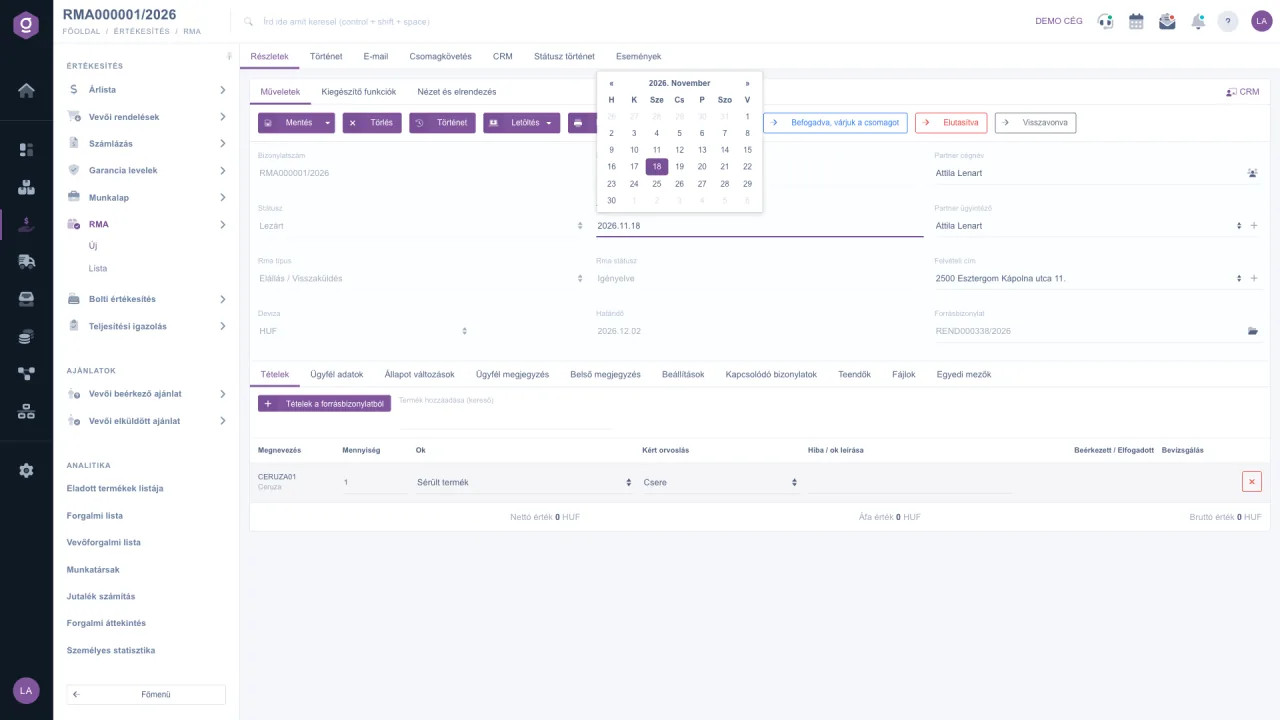
The product is being inspected. For each item you record the reason, the requested remedy and a description of the fault, so every decision has a traceable reason behind it.

  • Reason and requested remedy per item
  • Free-text description of the fault or reason
  • Internal and customer notes on a separate tab

5. A decision has been made

The inspection is complete. For each item you can see the received and accepted quantity, the decision and the fate of the product.

  • Accepted and received quantity
  • Decision per item
  • Fate of the product, for example scrapping

6. Settled and closed

Based on the decisions, you can start the credit note, replacement, repair or scrapping from the same place. Related documents can be followed on the RMA, and the full history is preserved.

  • Credit note in the invoicing module
  • Related documents in one place
  • Full status history that can be looked up
Illustration: the statuses and fields follow the Logzi RMA sheet, the values are examples.
Features

A returns management system that reaches all the way to finance

RMA is not a separate spreadsheet: it lives in the same system as orders, invoices and stock.

Three ways to start

You can create an RMA from a blank form, from an order or an invoice via the Document management menu, or from a request submitted through the customer portal, for which the system also sends an internal notification.

RMA sheet documentation

Linked to the source document

When started from an order or an invoice, the partner, currency and returnable items are filled in, and the system does not let you record more than the returnable quantity.

Automatic deadline

14 days for a withdrawal and 30 days for a warranty case from creation, shown in a separate column of the list.

Item-level data

Reason, requested remedy, fault description, received and accepted quantity, decision and the fate of the product.

Full traceability

On the Status changes tab every change appears with its date, note and team member.

Credit note, replacement, repair, scrapping

Based on the inspection decisions, you can start the credit note, replacement, repair or scrapping from the same place. The credit note is created in our invoicing software.

Parcel tracking and transport arrangement

You can follow the returned parcel on the RMA sheet and start arranging transport from the list. The goods can then be handled further in our warehouse management software.

What is RMA and how does it work?

If you would like to know more about the basics, such as what a return authorisation means, how the process works and how it brings order to returning goods, browse our blog.

Read more on our blog
Logzi RMA sheet: status buttons, items, reason and requested remedy
Instead of Excel and e-mail

Why manage returns in a dedicated RMA system?

For a handful of returns, e-mail may be enough, but as your online shop grows, cases, deadlines and credit notes become impossible to follow.

Excel and e-mail

  • The case is scattered across several e-mail threads and spreadsheets
  • Deadlines must be calculated and watched by hand
  • It is not visible which case is in which status
  • The inspection result stays in a separate note
  • The credit note is made by hand in a separate program

Logzi RMA

  • One record from request to closure
  • Automatic handling deadline: 14 or 30 days
  • Eight statuses, every change with date, note and team member
  • Reason, remedy, decision and fate of the product recorded per item
  • Credit note, replacement, repair or scrapping can be started from the same place
Documentation

Step by step, with screenshots

Every part of the RMA module has a detailed description in the software documentation.

Frequently asked questions

RMA management system: types, statuses, deadlines and credit notes

What does RMA mean, and when do you need it?

RMA (Return Merchandise Authorization) is a return authorisation: the procedure by which the customer announces a return in advance and the company authorises it. This way the goods can be tracked all the way, and the decision after inspection (credit, replacement, repair, scrapping) can be closed in an orderly way. Online shops need it for withdrawals and for warranty or defective performance cases, while traders and service companies need it for complaints.

What RMA types and statuses are there in Logzi?

There are three types: Uncollected parcel, Withdrawal / Return, and Warranty / Defective performance (Uncollected parcel cannot be selected for a new RMA). The statuses are: Requested, Accepted (awaiting the parcel), Rejected, Received, Under inspection, Inspected, Closed and Cancelled.

What is the handling deadline?

14 days for the Withdrawal / Return type and 30 days for the Warranty / Defective performance type, counted from creation. The system calculates the deadline automatically and shows it in a separate column of the RMA list.

Where can an RMA be started from?

In three ways: from a blank form, from an order or an invoice via the Document management menu, or from a request submitted through the customer portal (for which the system also sends an internal notification). When started from a source document, the partner, currency and returnable items are filled in, and the system does not let you record more than the returnable quantity.

What happens after the inspection?

For each item you record the reason, the requested remedy, the received and accepted quantity, the decision and the fate of the product. Based on the decisions, you can start the credit note, replacement, repair or scrapping from the same place, and the related documents can be followed on the RMA.

Can I see who changed a case and when?

Yes. On the Status changes tab every status change appears with its date, note and team member. The RMA also has History, E-mail, Parcel tracking and CRM tabs.

Can RMA be linked to invoicing and online shop orders?

Yes. An RMA can start from an order or an invoice, and the credit note is created in the invoicing module, so the return and the financial settlement stay in the same system.

Get started today

Sort out your returns before they become a mess

Sign up and try the RMA module with your own orders, or request a demo and we will show you how it fits the processes of your online shop.