Invoicing software that handles stock and NAV reporting too

The built-in invoicing of Logzi ERP manages invoices, proforma invoices, advance invoices and final invoices in one system. Data reporting to the Hungarian tax authority (NAV) is automatic, and payments and warehouse stock are tracked in the same place.

  • NAV data reporting
  • Proforma, advance and final invoices
  • Recurring invoices
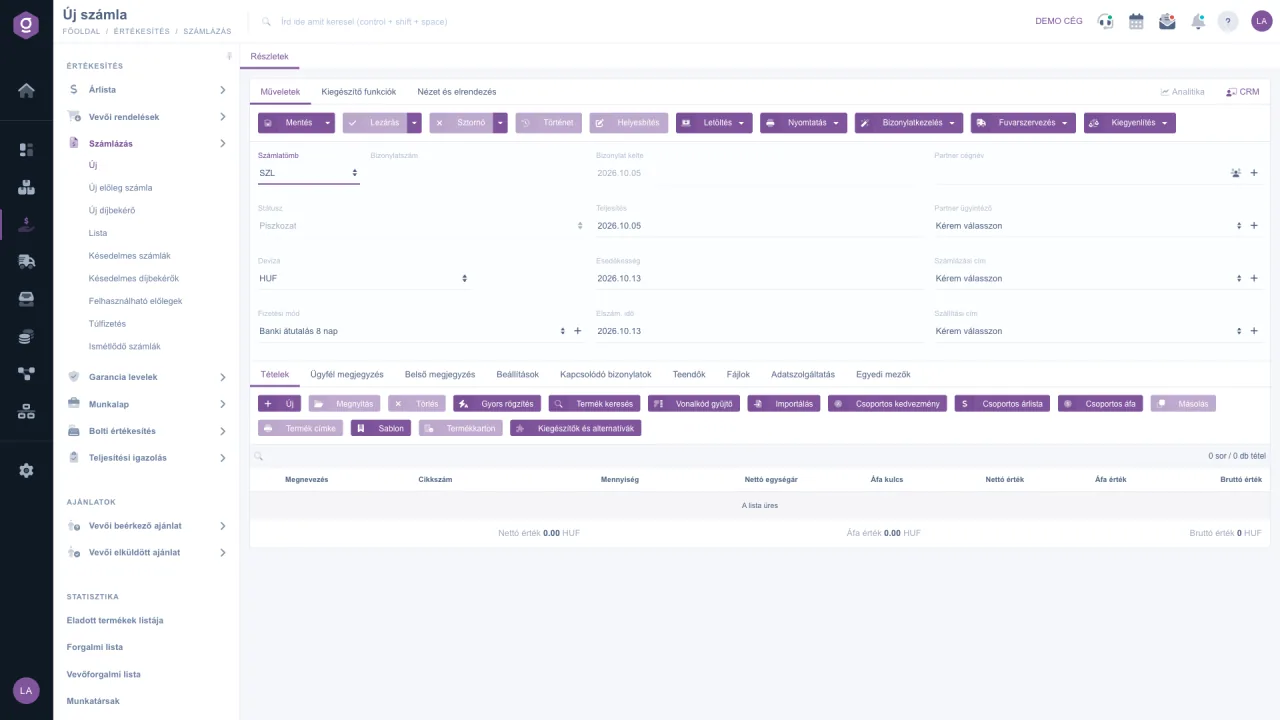
Logzi invoicing software: new invoice form with the proforma and advance invoice menu items
Compatible with NAV Online Invoicing

In short

Logzi invoicing software is a full-featured invoicing system, compatible with the Hungarian NAV Online Invoicing system, and part of the ERP. You can issue invoices, proforma invoices, advance invoices and final invoices, schedule recurring invoices, and register incoming invoices from the NAV Online system or by e-mail. Invoices are linked to orders, stock and payments, so you do not have to stitch separate programs together.

4document types in one form: invoice, advance, proforma, manual invoice
5ways to add line items, from XLSX import to barcodes
6recurrence frequencies, from weekly to yearly
31 March 2021NAV Online Invoicing data reporting became mandatory in Hungary
Proforma, advance and final invoice

One chain you don't have to link by hand

For project-based orders, prepayments or orders paid in instalments, three documents follow one another. In Logzi all three are created with the same form, and the system shows what has been paid and what you can deduct from the final invoice.

Read more on our blog
Proforma invoiceExample: PF-2026/0012
Unpaid
Custom furniture, 1 pcHUF 1,000,000
VAT 27%HUF 270,000
Amount dueHUF 1,270,000
NAV: no data reporting requiredTracked in the Overdue proforma invoices list

With a proforma invoice the customer can pay in advance. It is not an invoice, so it creates no tax or VAT liability. The system lists unsettled proforma invoices separately.

Advance invoiceExample: ADV-2026/0007
Paid
30% advance, custom furnitureHUF 300,000
VAT 27%HUF 81,000
Advance paidHUF 381,000
NAV: sent, acceptedIn the Usable advances list

An advance invoice is already a genuine invoice, so data reporting takes place as well. The system keeps track of how much of the advance can still be applied on the final invoice.

Final invoiceExample: INV-2026/0431
Closed
Custom furniture, 1 pcHUF 1,000,000
Deducted: advance-HUF 300,000
VAT 27%HUF 189,000
Amount dueHUF 889,000
NAV: sent, acceptedCancellation, correction, credit note

The final invoice contains the full amount, with the advance deducted. Once closed, you can cancel it, correct it or credit it.

Illustration with sample data: document numbers and amounts are not real.
Common question

Proforma invoice, advance invoice and invoice: what's the difference?

One of the most searched invoicing questions. This overview is general information; for tax questions, always consult your accountant.

Proforma invoiceAdvance invoiceInvoice / final invoice
Counts as an invoice?No, a request for paymentYesYes
Tax and VAT liabilityNone arisesArises on the advanceArises, less the advance
NAV data reportingNot requiredRequiredRequired
When to use it?For prepayment, after the quote is acceptedWhen you request or receive an advance before deliveryOn delivery, for the full amount
Logzi menu itemNew proforma invoiceNew advance invoiceNew invoice
Features

Everything you may need from invoicing software

Logzi invoicing is not a standalone application: the same database serves invoices, stock, orders and finance.

One form, four document types

Invoices, advance invoices, proforma invoices and manual invoices all use the same editor. In the header you can set the invoice series, payment method, currency, the dates of delivery and payment due, the customer and the addresses.

Invoice sheet documentation

Fast line item entry

You can add items by hand, with the Quick entry window, by product search, from a barcode collector list or by XLSX import. Saving and closing are separate steps, so you can edit the invoice freely until you close it.

NAV Online Invoicing

Data reporting of issued invoices to NAV is automatic, and you can see the status on the invoice.

Cancellation, correction, credit note

You can cancel, correct or credit a closed invoice, and the status of the invoice is always visible.

Payments and overdue items

Manual or bank-connected settlement, overdue invoices and proforma invoices in separate lists, and a record of usable advances.

Payments

Incoming invoices from NAV and e-mail

Incoming invoices downloaded from the NAV Online system are easy to register, and PDF invoices received by e-mail can be registered from the invoice-receiving e-mail address using AI processing. Invoices about to fall due are shown in a separate list.

Online incoming invoices

Online shop and stock in one system

With Shoprenter, UNAS, WooCommerce, Shopify and PrestaShop extensions, orders flow into Logzi, where invoicing, delivery notes and stock movements are linked together. For the warehouse side, read about our warehouse management software.

Invoice list, filtering, printing, e-mail

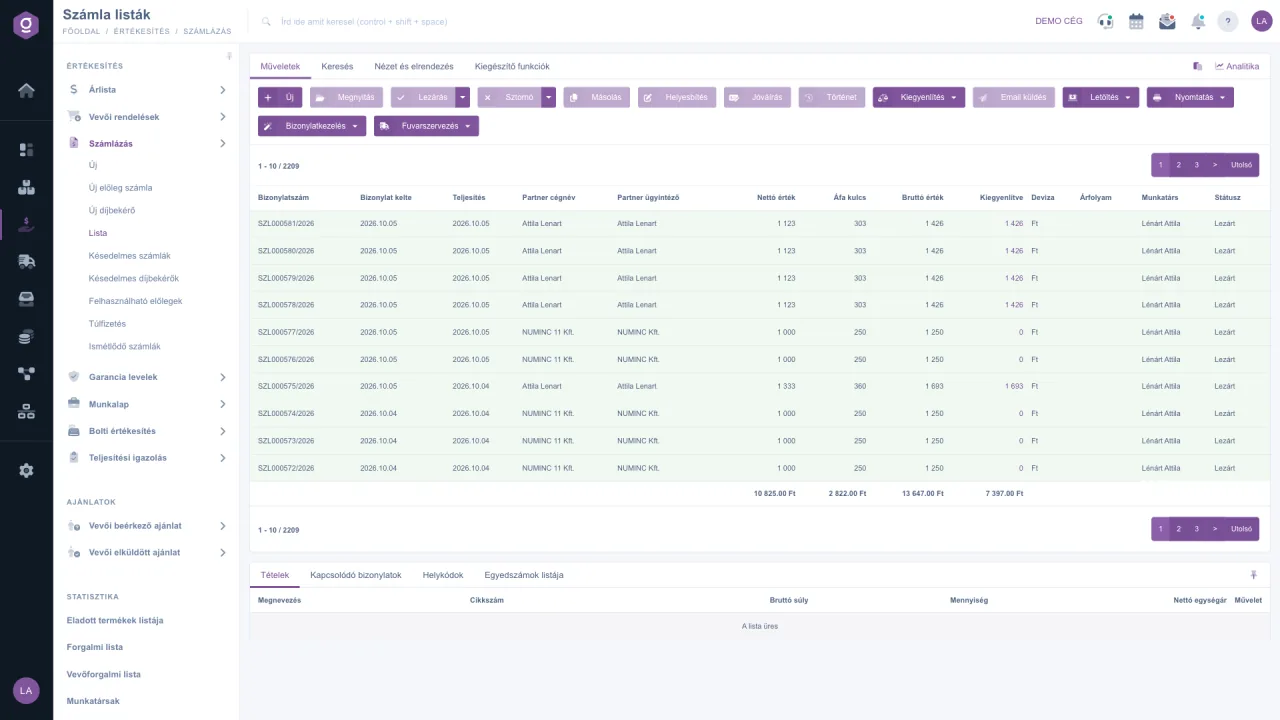
In the invoice list you can search, filter, print, download and send invoices by e-mail, and on a selected invoice the bottom tab shows the line items and related documents.

Invoice list
Logzi invoice list: issued invoices, statuses and payments
Recurring invoice

Rent, subscription, monthly fee: set it up once

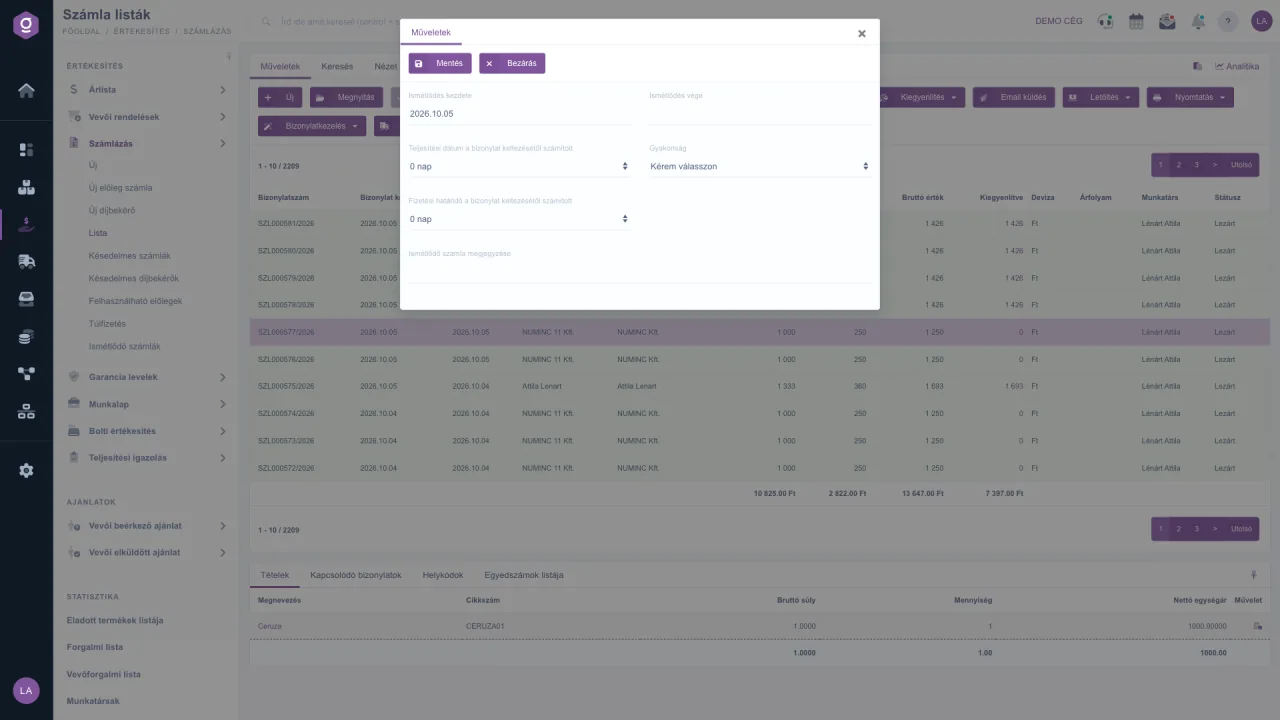
If you issue the same invoice regularly, you don't have to enter it again. From a closed invoice you start a schedule: you enter the first and last day, the offset of the delivery date and payment deadline, and then choose the frequency.

The recurrence can be weekly, fortnightly, monthly, quarterly, half-yearly or yearly. On the set day the system issues a new invoice with identical content and closes it, and the Recurring invoices list shows the next expected date and the invoices already issued.

Recurring invoices documentation
Setting up a recurring invoice in Logzi: start, end, frequency and payment deadline
Frequently asked questions

Invoicing software: what to know about proforma invoices, advance invoices and NAV

What is the difference between a proforma invoice, an advance invoice and a final invoice?

A proforma invoice is not an invoice, only a request for payment: it creates no tax or VAT liability and no data has to be reported to the Hungarian tax authority (NAV). An advance invoice is already a genuine invoice, issued because of a prepayment, and its data is reported. The final invoice contains the full amount and deducts the advance already invoiced and paid. For tax questions, always consult your accountant.

Is NAV Online Invoicing data reporting mandatory, and does Logzi handle it?

Yes, in Hungary. Since 31 March 2021 the data of every invoice issued to a domestic taxpayer must be reported to the Hungarian tax authority (NAV). After a one-off NAV connection setup, Logzi sends the data reporting automatically, and on the Data reporting tab of the invoice you can see whether the request was sent, successfully accepted or rejected. Technical annulment and manual reporting are also supported.

How does recurring invoicing work?

You start a schedule from a closed invoice: you enter the first and last day, the offset of the delivery date and payment deadline, and the frequency (weekly, fortnightly, monthly, quarterly, half-yearly or yearly). On the set day the system issues a new invoice with identical content and closes it. The Recurring invoices list shows the next expected date and the invoices already issued.

How can I add line items to an invoice quickly?

In five ways: by hand, with the Quick entry window, by product search, from a barcode collector list or by importing an XLSX file. Saving and closing are separate steps, so you can edit the invoice freely until you close it.

Can the invoicing be linked to my online shop and stock?

Yes. Shoprenter, UNAS, WooCommerce, Shopify and PrestaShop online shops can be connected with extensions. Orders flow into Logzi, where invoicing, delivery notes and stock movements happen in the same system, linked to each other.

How do I track unpaid invoices and proforma invoices?

You can settle invoices manually (cash, bank transfer) or with a bank connection extension. The Overdue invoices and Overdue proforma invoices lists show debts past their due date, and the Usable advances list shows the advances you can still deduct from a final invoice.

What statuses can an invoice have, and what can I do about a faulty invoice?

An invoice starts as a draft and becomes final when you close it. After closing you can cancel, correct or credit it. The statuses are: Draft, Closed, Cancellation, Cancelled, Correcting and Corrected.

What about incoming (supplier) invoices?

Incoming invoices downloaded from the NAV Online system can be registered, and PDF invoices received by e-mail can be registered from the invoice-receiving e-mail address using AI processing. A separate list shows incoming invoices that are close to or past their payment deadline.

Get started today

Invoice smarter, in one system

Sign up and try the invoicing with your own data, or request a demo and we will show you how it fits your processes.