On the Currency roundings page you set how the system rounds amounts in a given currency and, if needed, for a given payment method.
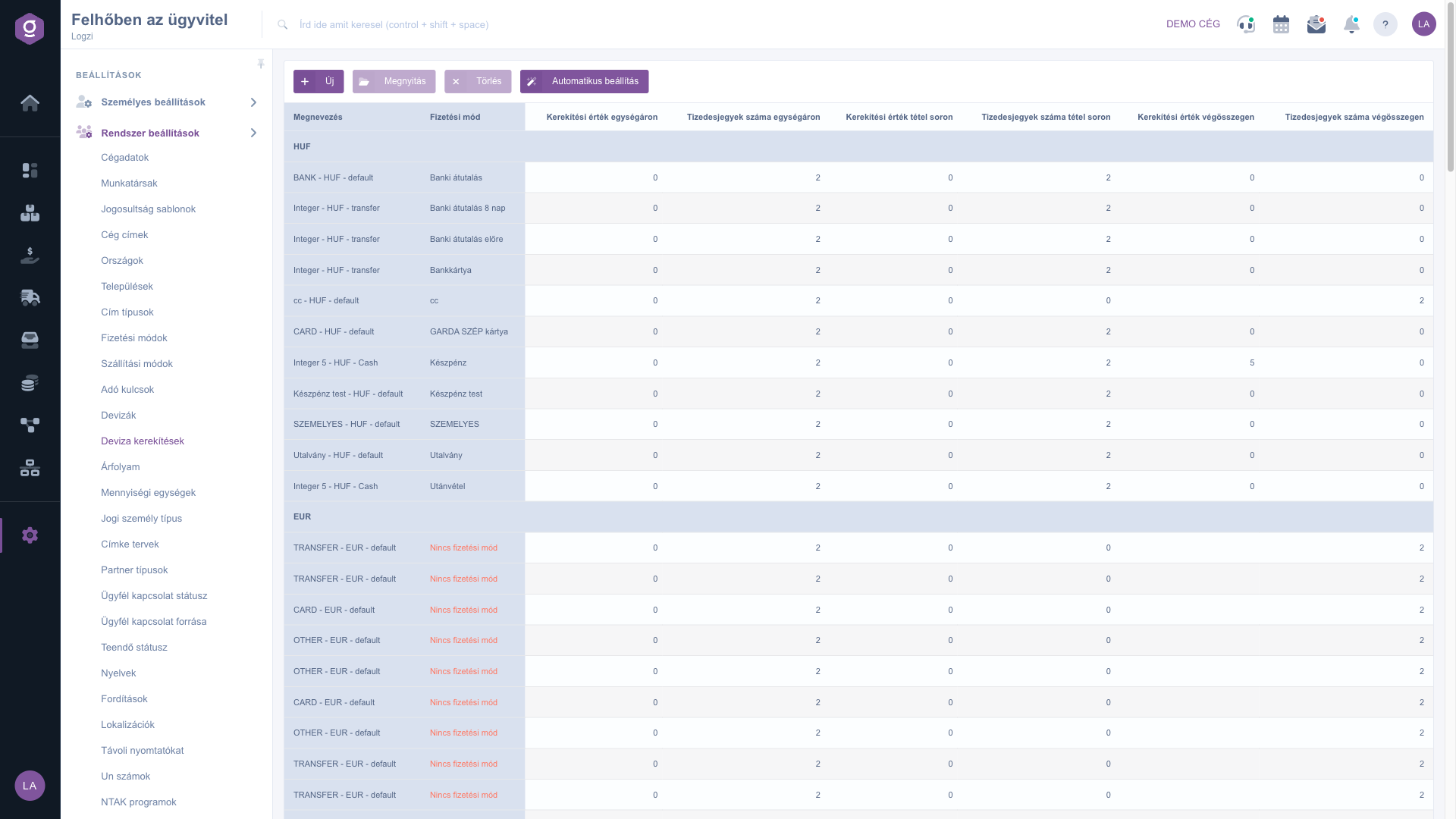
Click Main menu / Settings / System settings / Currency roundings. At the top you see the New, Open, Delete and Automatic setup buttons. The list shows the Name, Payment method and the Rounding value and Number of decimal places columns for the unit price, the item row and the total, grouped by currency. The screenshots were taken in the Hungarian interface.
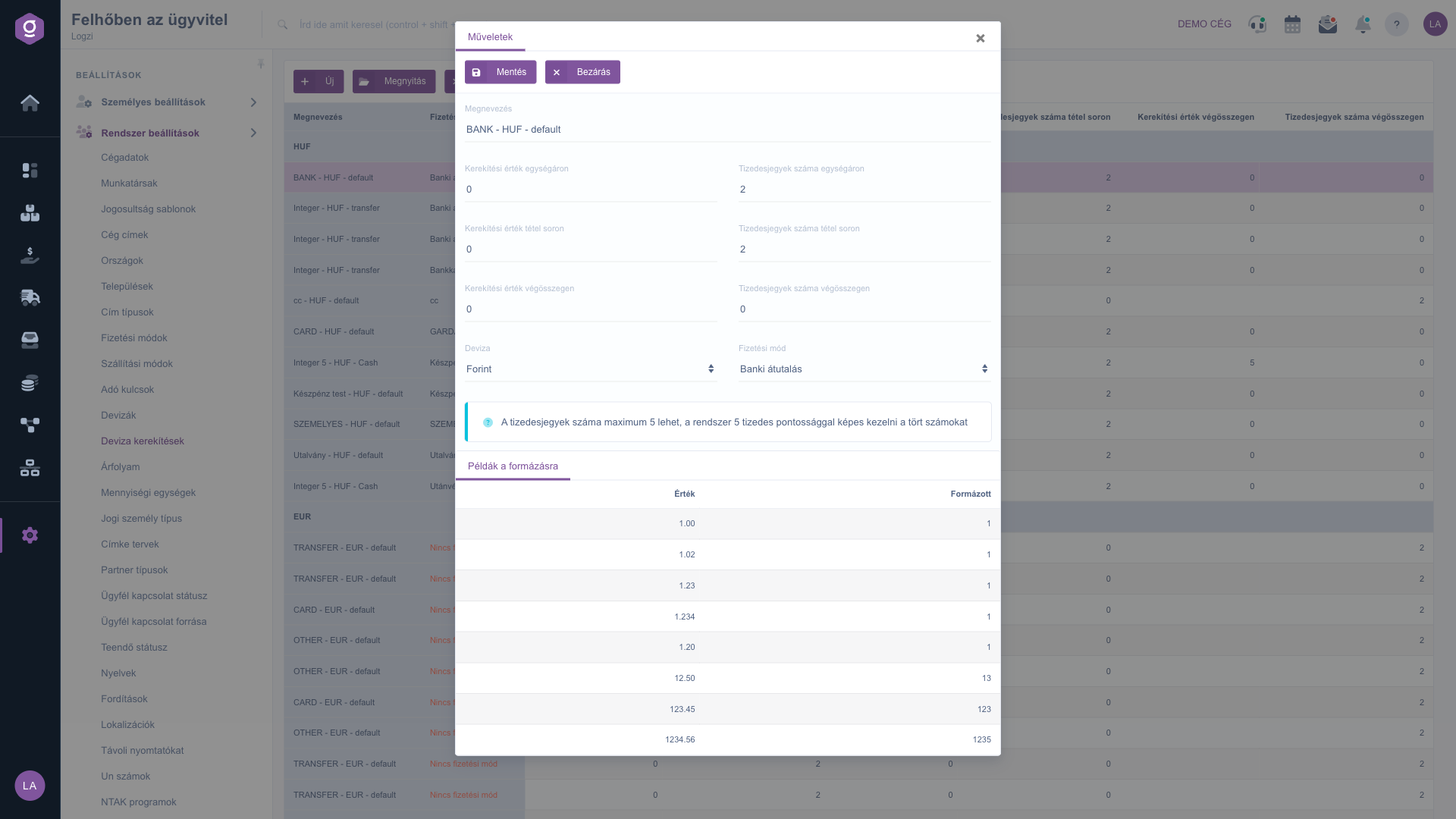
Click New, or select a row and click Open. On the Actions tab of the window that opens, below the Save and Close buttons, enter the Name (at least 2 characters), then the six number fields: Rounding value on unit price, Number of decimal places on unit price, Rounding value on item row, Number of decimal places on item row, Rounding value on total and Number of decimal places on total. Choose the Deviza (Currency, required) and, if the rule applies to one payment method only, the Payment method. The number of decimal places can be 5 at most. The Formatting examples tab at the bottom shows how amounts appear with the setting. Finally click Save.
The Automatic setup button creates or updates exactly one rounding row for every active currency and payment method according to the rules. Rows without a payment method or currency, as well as duplicate rows, are deleted, so the system asks for confirmation before it runs. To delete one row, select it and click Delete.
Try the Automatic setup button first: in most cases it creates the rows you need, and afterwards you only have to change the individual exceptions by hand.
The fields of the rounding form.
| Field | Required | Description |
|---|---|---|
| Name | The name of the rounding, at least 2 characters. | |
| Rounding value on unit price | The rounding value on the unit price, as a number. | |
| Number of decimal places on unit price | The number of decimal places of the unit price, 5 at most. | |
| Rounding value on item row | The rounding value on the item row, as a number. | |
| Number of decimal places on item row | The number of decimal places of the item row, 5 at most. | |
| Rounding value on total | The rounding value on the total, as a number. | |
| Number of decimal places on total | The number of decimal places of the total, 5 at most. | |
| Deviza (Currency) | The currency the rule applies to. | |
| Payment method | The payment method the rule applies to; if empty, the rule is not tied to a payment method. |
The Name (at least 2 characters), the six number fields and the Currency are required, and the number fields accept numbers only.
At most 5: the system can handle fractional numbers with 5 decimal precision.
It creates or updates one rounding row for every active currency and payment method. Rows without a payment method or currency, and duplicate rows, are deleted. It asks for confirmation first.
The default rounding set at the currency applies in most cases. Where a payment method can also be chosen, for example on invoices, the rounding of the currency and payment method pair is used.
The menu item is located under Main menu / Settings / System settings. If you do not see it, your user probably does not have the required permission; ask your administrator to check the settings.
Don't want to spend hours searching for a solution? Choose the most efficient way: book a personalized, 45-minute online training session dedicated entirely to you. Whether it's a walkthrough of the basics or a detailed setup of a specific module, our expert colleague will guide you through the whole process, step by step.
Don't waste your time - ask for help!
Our goal is to get you using our system as quickly and efficiently as possible. Whether you're completely new to us or stuck on a specific setting, don't hesitate to ask for help!
Create your account now,
pay later!


