License keys

Learn about the License keys page: it shows the licenses purchased by your business and their expiry, and you can start the activation or renewal from here.

Function overview

On the License keys page you see the licenses purchased by your business. Every license appears in its own panel: the QR code of the license key, the name and description of the package, the activation and expiry dates, and the license key itself.

  • The Activate button takes you to the License activation page, where the license key is already filled in.
  • The Renew button puts the purchasable package into the cart.
  • The Details button leads to the Logzi start page.
Activation is described in the License activation help page, purchasing packages in the License packages help page.

Step by step

1. Viewing your licenses

Open the Main menu / Subscription / License / License keys menu item. Every license of your business appears in its own panel. On the left side of the panel you see the QR code of the license key, next to it the name and description of the package. The screenshots were taken in the Hungarian interface.
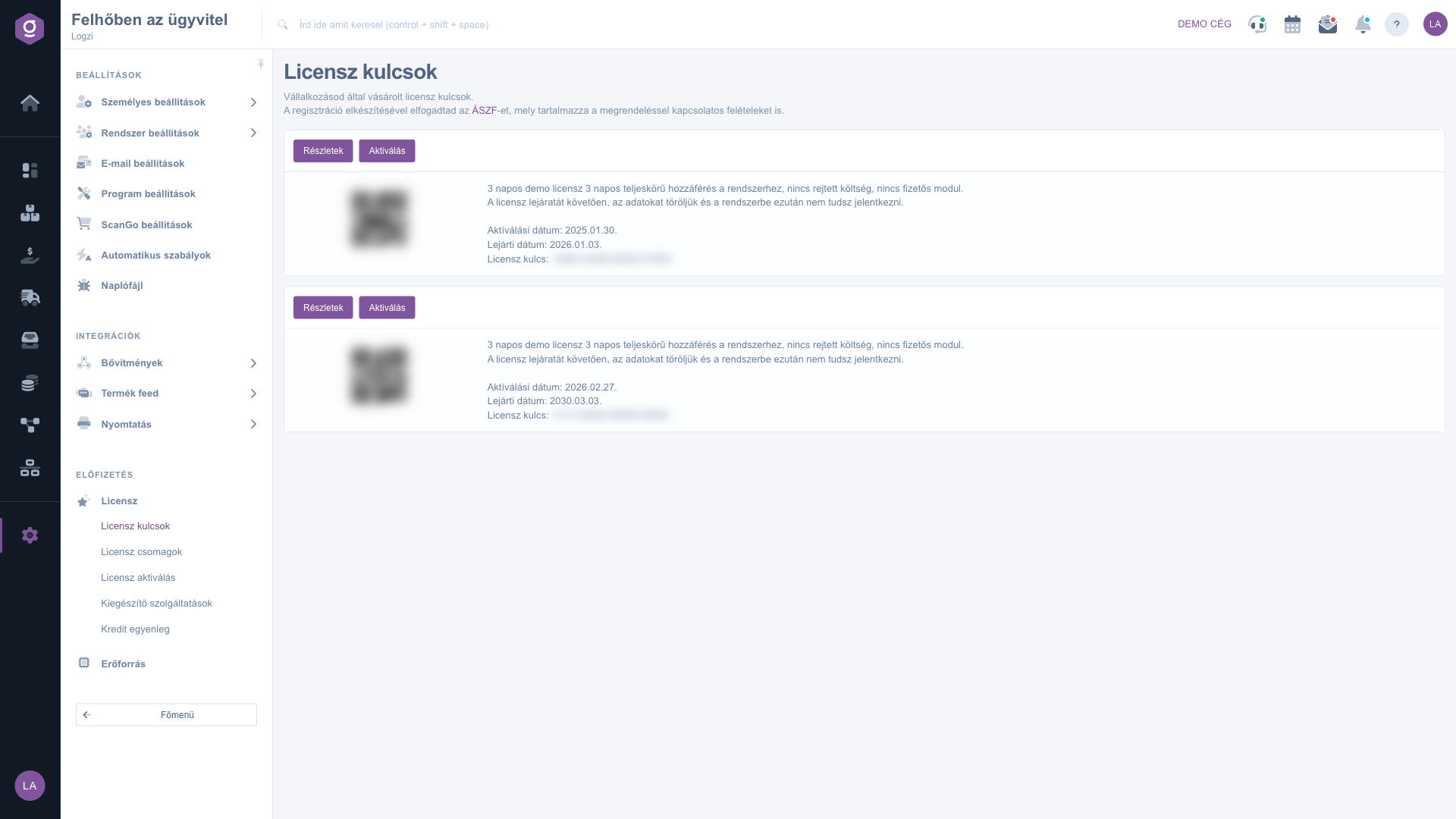
The License keys page with two license panels (keys and QR codes blurred)

2. Checking the expiry

At the bottom of the panel, the Activation date and Expiry date lines show when the license started and when it expires. It is worth renewing before the expiry.

3. Activating the license

Click the Activate button. The License activation page opens, where the License key (hardcoded label: Licensz kulcs) field is already filled in; for some packages your Logzi ID is also entered in advance. The further steps of the activation are described in the License activation help page.

4. Renewing the license

The Renew button is only visible if the package can be purchased. When you click it, the system puts the package into the cart, where you can finalize the order.

Tip


Treat the license key as confidential and do not share screenshots of it. When the expiry approaches, use the Renew button in time so that your use of the system is not interrupted.


Field description

The data of the license panel. There is no field to fill in on this page, all data is display only.

FieldRequiredDescription
QR codeThe QR code containing the license key.
NameThe name of the purchased package.
DescriptionA short description of the package.
Activation dateThe day the license was created and activated.
Expiry dateThe day the license expires.
Licensz kulcs (License key)The unique key of the license, which you use for the activation.

The buttons of the panel:

  • Details: leads to the Logzi start page.
  • Activate: opens the License activation page with the license key filled in.
  • Renew: puts the package into the cart. Only visible for purchasable packages.

Frequently asked questions

The list is empty if your business has no purchased license yet. You can buy packages on the License packages page.

The key is shown in the license panel, in the Licensz kulcs (License key) line next to the QR code. You need to enter the same key during the activation.

Click the Renew button of the panel; this puts the package into the cart, where you can finalize the order. If the button is not visible, ask for help using the contact details on the Contact us page.

The Activate and Details buttons only appear for license type items. The Renew button is visible for purchasable packages.

The menu item is in the Subscription group of the Settings menu. If you do not see it, you probably do not have permission for it; ask your administrator to grant access.

Need personalized help?

Don't want to spend hours searching for a solution? Choose the most efficient way: book a personalized, 45-minute online training session dedicated entirely to you. Whether it's a walkthrough of the basics or a detailed setup of a specific module, our expert colleague will guide you through the whole process, step by step.

Don't waste your time - ask for help!
Our goal is to get you using our system as quickly and efficiently as possible. Whether you're completely new to us or stuck on a specific setting, don't hesitate to ask for help!

Logzi warehouse management software

Get in touch with us

Interested in our software? Feel free to write to us!

Need help?

If you can't find the answer and need assistance

Create your account now,
pay later!

Try it free for 3 days, no risk, no obligation!
