On the License activation page you can activate a purchased license. You have to enter two values: the Licensz kulcs (License key) and the Logzi ID / Eszköz ID (Logzi ID / Device ID). After the Kérem az aktiválási kulcsot (Request the activation key) button the system works in one of two ways:
Open the Main menu / Subscription / License / License activation menu item, or click the Activate button on the License keys page. In the latter case the license key arrives already filled in. The screenshots were taken in the Hungarian interface.
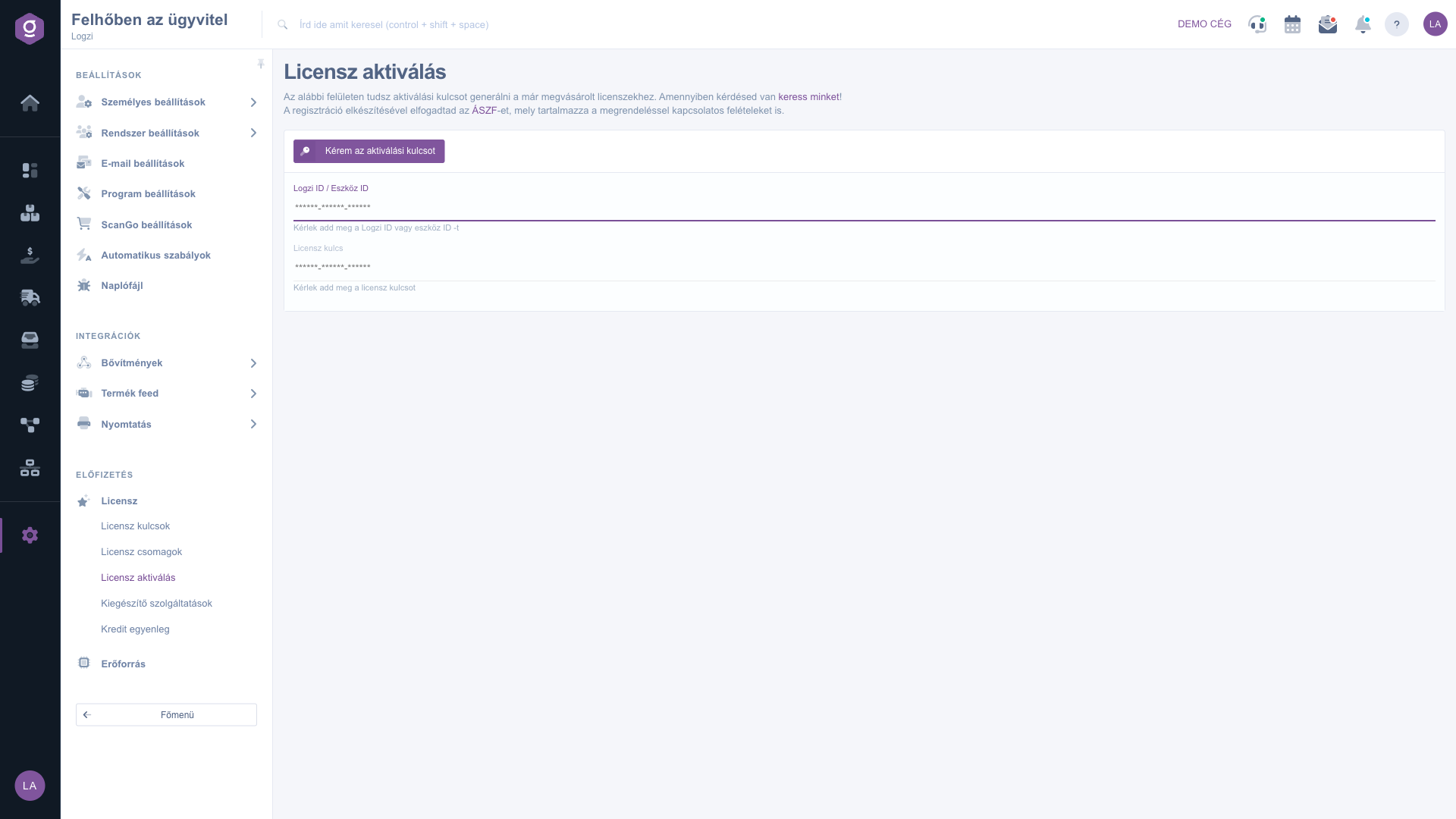
In the Logzi ID / Eszköz ID field enter your own Logzi ID or the ID of the device you want to activate. In the Licensz kulcs (License key) field paste the key of the purchased license.
Click the Kérem az aktiválási kulcsot (Request the activation key) button. If you entered your Logzi ID, the system activates the license and the software immediately and the Sikeres aktiváció (Successful activation) message appears: A licenszed és a szoftver aktiválva lett! (Your license and the software have been activated!)
If you entered a device ID, a window titled Aktivációs kulcs (Activation key) opens with the key and the QR code. Use it on the device to activate it.
You find the device ID in the app. Copy it exactly, without spaces, because a mistyped ID does not produce a valid activation.

The page contains two fields to fill in and one button.
| Field | Required | Description |
|---|---|---|
| Logzi ID / Eszköz ID (Logzi ID / Device ID) | Your own Logzi ID (instant activation), or the ID of the device to activate (requesting an activation key). | |
| Licensz kulcs (License key) | The key of the purchased license. You find it on the License keys page. |
Error messages: if a value is missing or wrong, the system shows a message in Hungarian:
The Logzi ID is the identifier of your partner. For some licenses the Activate button on the License keys page fills in this field in advance. If you cannot find it, ask the administrator.
With the Logzi ID the license and the software are activated immediately. With a device ID the system gives an activation key and a QR code that you have to use on the device.
The validity period of the license has run out. Renew it on the License keys page with the Renew button, then try the activation again.
The entered key cannot be found. Check that you copied it exactly from the License keys page and that there is no space at the end.
The menu item is in the Subscription group of the Settings menu. If you do not see it, you probably do not have permission; ask the administrator to enable access.
Don't want to spend hours searching for a solution? Choose the most efficient way: book a personalized, 45-minute online training session dedicated entirely to you. Whether it's a walkthrough of the basics or a detailed setup of a specific module, our expert colleague will guide you through the whole process, step by step.
Don't waste your time - ask for help!
Our goal is to get you using our system as quickly and efficiently as possible. Whether you're completely new to us or stuck on a specific setting, don't hesitate to ask for help!
Create your account now,
pay later!

