Bank receipt analytics

An analysis of your bank items split into tabs: turnover, partners, pretenses and bank costs, matching status and audit.

Function overview

Bank receipt analytics is a summary analysis of your bank items: how large the bank turnover is, which partners and pretenses dominate, how high the bank costs are and how many items still wait to be matched with an invoice or another document. The page is view-only.

The amounts include valid items only: drafts and stornoed documents are not counted, you find them on the Audit tab. The data is split into five tabs: Overview, Partners, Pretenses and costs, Matching and Audit.

Step by step

1. Open the page

Click Main menu / Cash register / Bank receipt analytics (you find it in the Analytics group). The Overview tab opens with the income and expense amounts of the bank items, the ratio of the Imported items and monthly charts.
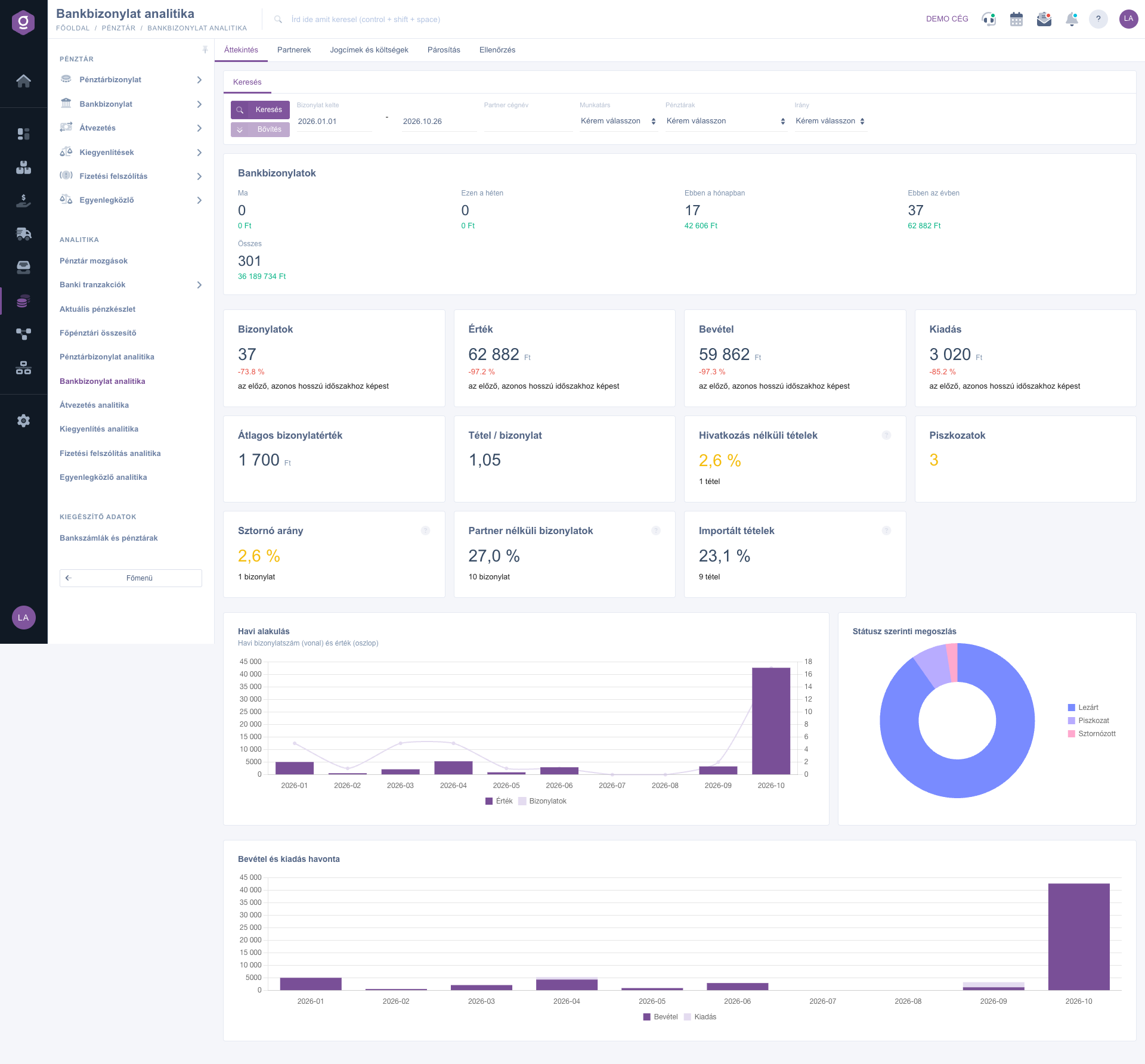
The overview of the Bank receipt analytics

2. Filter

On the Search tab enter the Document date period and, if needed, the partner, the Employee, the Cash registers and the direction filter, then click Search. The filter stays active on every tab.

3. Pretenses and bank costs

The Pretenses and costs tab shows the amount of the Bank debits and the Bank credits, the Average bank debit, the amount of the ATM and cash movements and their monthly trend.
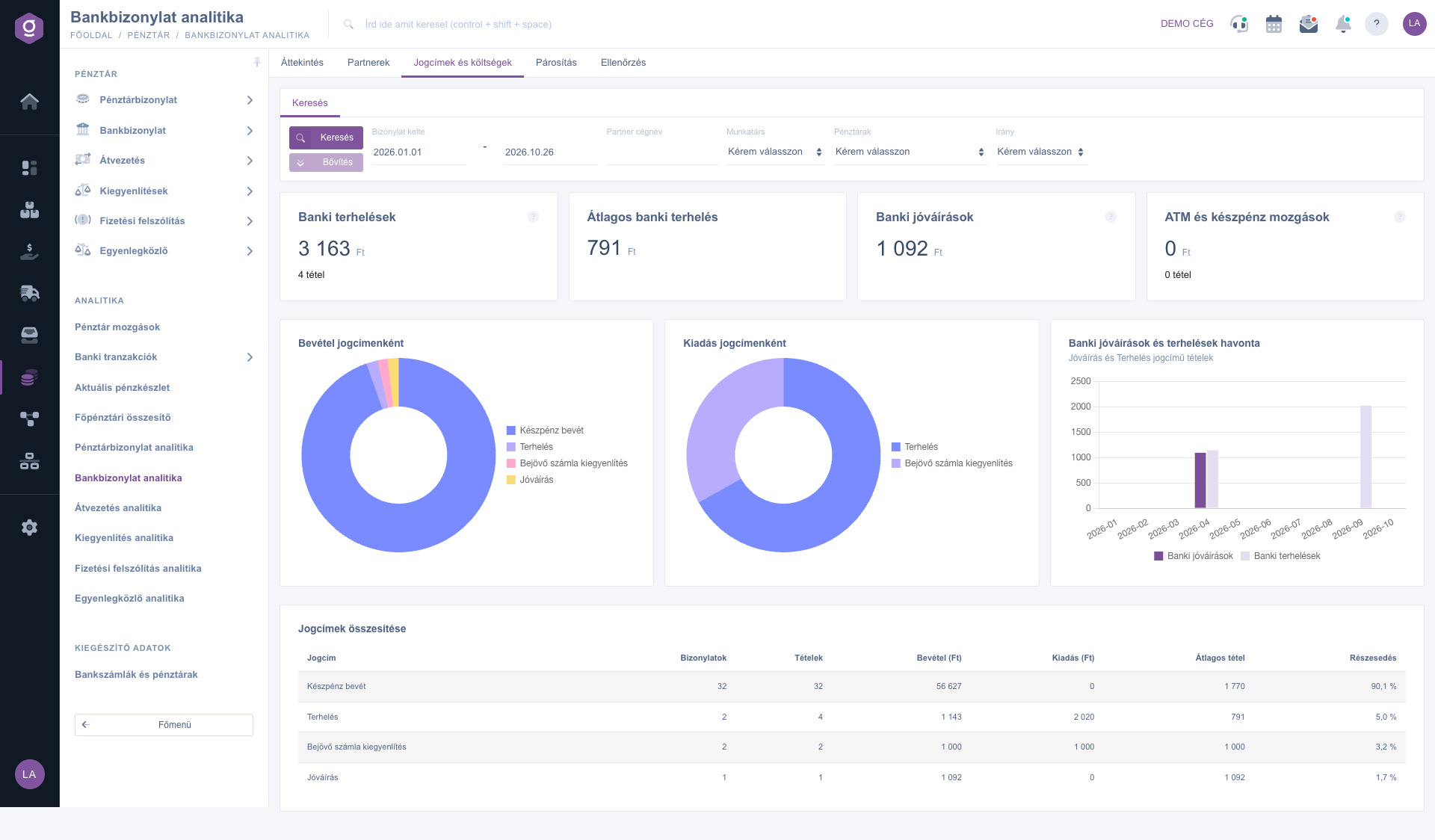
The Pretenses and costs tab

4. The matching status

On the Matching tab the Matched ratio, the Items without linked document and the Unmatched, all time figures show how many bank items are already linked to an invoice. You also find the oldest items without a linked document, the items without partner and the list of Duplicate transaction ids here.
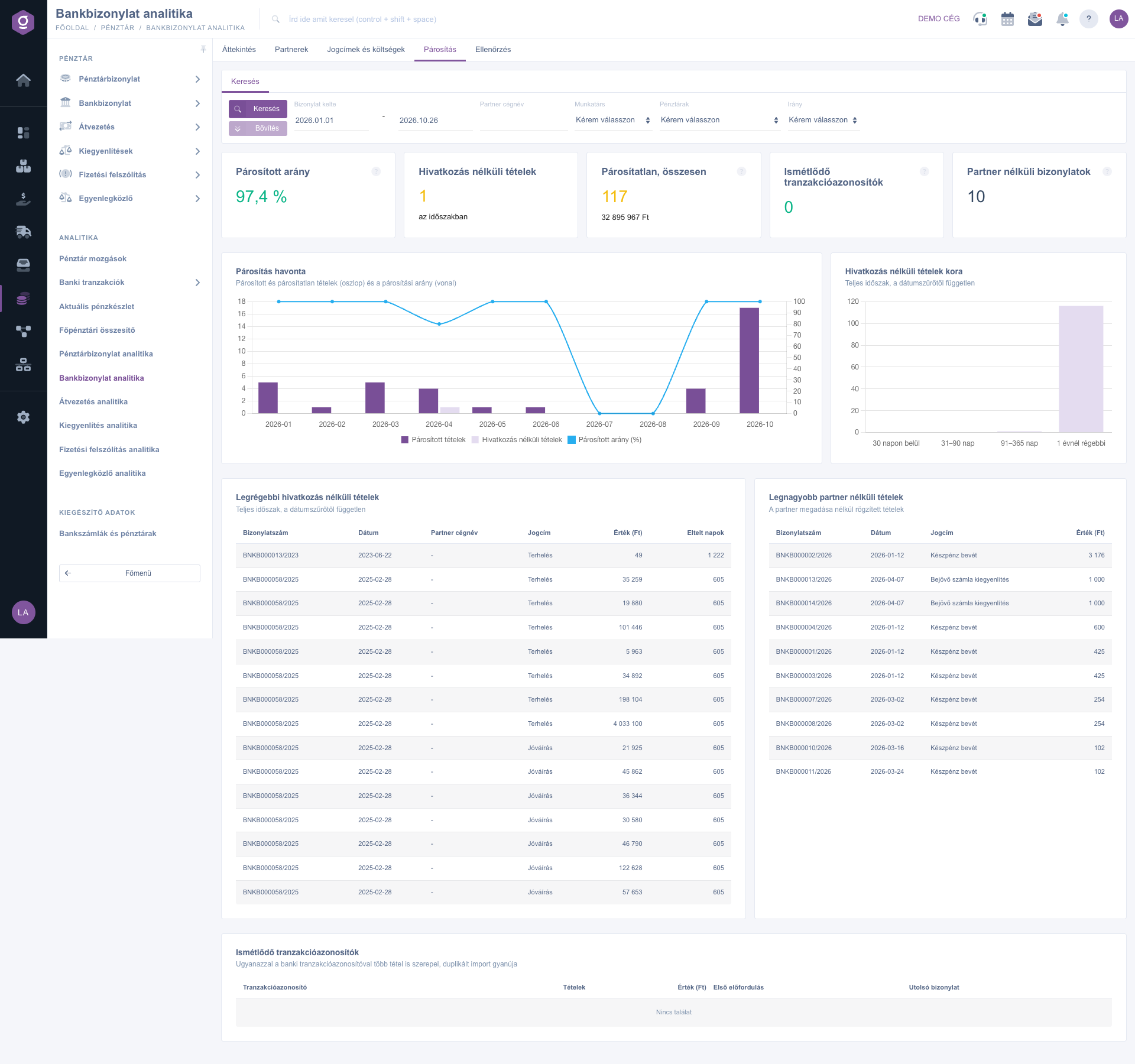
The Matching tab
The Matching tab

5. Audit

The Audit tab collects drafts, stornoed documents, items without amount and outlier items.

Tip


The Duplicate transaction ids list warns about a duplicated bank import: if the same transaction id appears more than once, check the import.


You can read about the list of bank items in the Bank transactions guide and about recording bank documents in the Bank document list guide.

Field reference

TabDescription
OverviewBank income, expense, net movement, number of items, the ratio of imported items and items without a linked document, with monthly charts.
PartnersTop payers and payees, documents without partner.
Pretenses and costsBank debits and credits, average bank debit, ATM and cash movements, monthly trend.
MatchingMatched ratio, unmatched items, matching per month, age of the items without a linked document, duplicate transaction ids.
AuditDrafts, stornoed documents, items without amount and outlier items.

Filters

On the Search tab you can use the Document date, Partner company name, Employee, Cash registers and Direction filters; the filter applies to every tab. There is no download on this page.

Frequently asked questions

It is the share of the bank items in the selected period that are already linked to an invoice or another document. The closer it is to 100 percent, the fewer items you have to match manually.

There is no valid bank item in the selected period or the filters are too narrow. Widen the Document date period and clear the other filters.

The Main menu / Cash register / Bank receipt analytics item appears only if both the analytics module and the bank receipt module are assigned to your user. If you cannot find it, ask your administrator to enable it.

Need personalized help?

Don't want to spend hours searching for a solution? Choose the most efficient way: book a personalized, 45-minute online training session dedicated entirely to you. Whether it's a walkthrough of the basics or a detailed setup of a specific module, our expert colleague will guide you through the whole process, step by step.

Don't waste your time - ask for help!
Our goal is to get you using our system as quickly and efficiently as possible. Whether you're completely new to us or stuck on a specific setting, don't hesitate to ask for help!

Logzi warehouse management software

Get in touch with us

Interested in our software? Feel free to write to us!

Need help?

If you can't find the answer and need assistance

Create your account now,
pay later!

Try it free for 3 days, no risk, no obligation!
