CMR analytics

Get to know the Logzi CMR analytics: issued CMRs, consignees and routes, linked documents, the watch list of foreign invoices without CMR, numbering audit and the age of drafts.

Feature overview

The CMR analytics is the statistics page of the issued CMR consignment notes. It is important to know that the CMR document has no items and no price, so the page analyses the issuing, the consignees, the routes, the linked documents and the order of the register; the weight and the value come from the delivery notes and invoices linked to the CMR. It helps you answer questions such as:

  • How many CMRs did you issue, to whom and for which route?
  • For which invoice to a foreign country was no CMR created?
  • Which CMR has no other document linked to it?
  • Is a serial number missing from the numbering of the CMRs, and how many old drafts do you have?
  • Overview: daily, weekly, monthly, yearly and total CMRs, the main indicators compared with the previous period, the monthly trend and the split by status.
  • Consignees: top consignees, destination countries, destination cities and top routes.
  • Coverage: linked documents, CMRs without links, foreign invoices without CMR, shipped weight and value, carriers.
  • Register: numbering audit, age of drafts, colleagues and the creation time heatmap.

The possible statuses of a CMR are: Draft, Closed, Cancellation, Cancelled. The statistics count issued (not draft, not cancellation) and not deleted CMRs; drafts, cancellations and deleted documents are shown by separate indicators.

Step by step

1. Opening the page and filtering

Click Main menu / Transport / Analytics / CMR analytics to open the page. On the Search tab you can narrow the data with the Document date field pair, a part of the company name typed into the Consignee field and the Employee list, then click the Search button. When you open the page, the period from 1 January of the current year to today is shown. The screenshots are taken from the Hungarian demo interface.

2. Overview

The top strip shows the number of issued CMRs for Today, This week, This month, This year and All (independent of the filter). Below it you see the Issued CMR compared with the previous period of the same length (+/- %), the Consignees, the Drafts, the Storno ratio, the Printed CMR and the Deleted documents indicators. The charts give the monthly trend and the split by status.
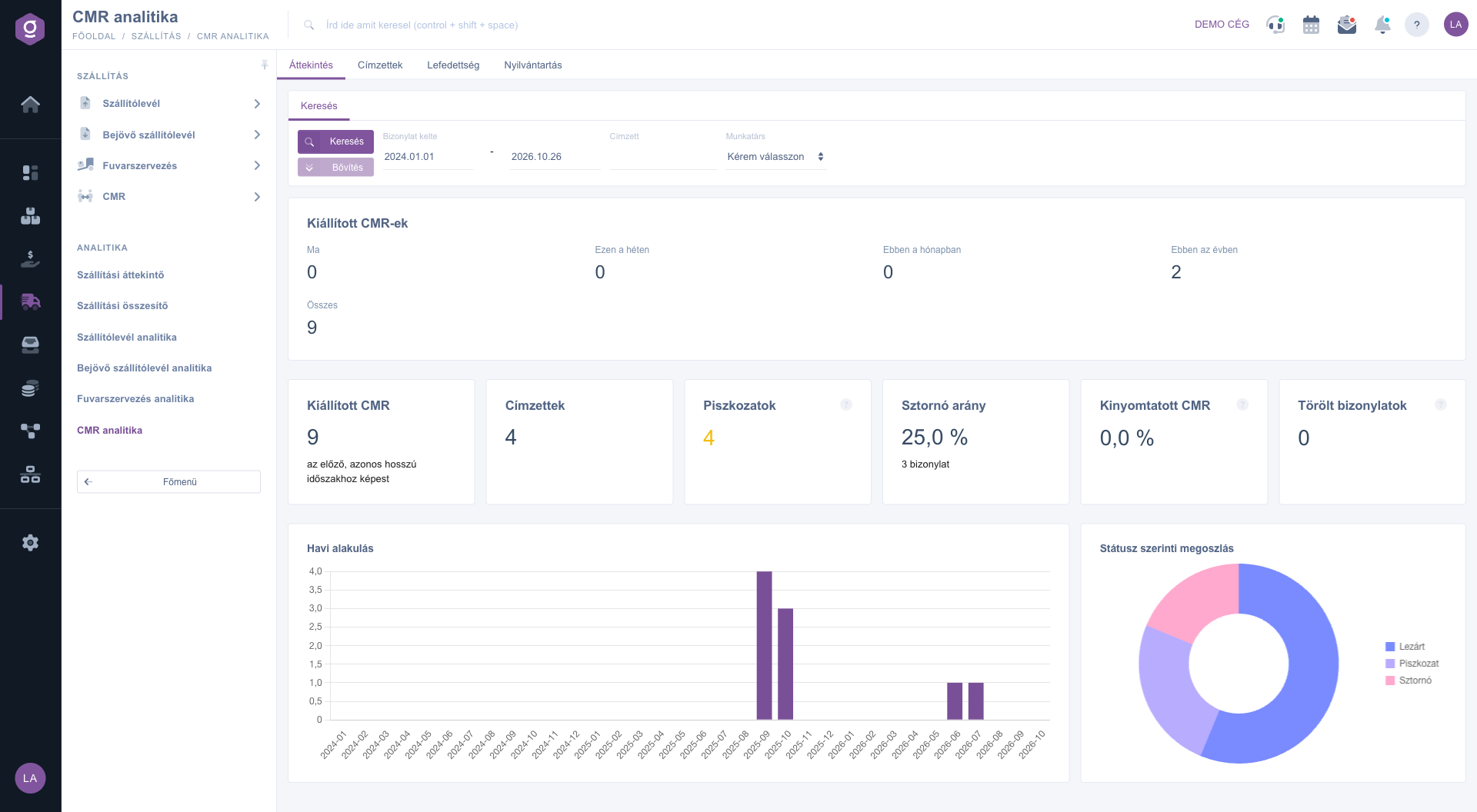
CMR analytics – Overview tab (Áttekintés)

3. Consignees

The Top consignees chart shows the partners who receive the most CMRs, the Destination countries and Destination cities show the split by the address of the consignee on the CMR. The International share is the ratio of the CMRs outside the most frequent destination country. The Top routes table ranks the routes from the address of the company to the city of the consignee, for example Esztergom → Budapest. The addresses show the data valid when the CMR was issued, even if the address of the partner changed later.
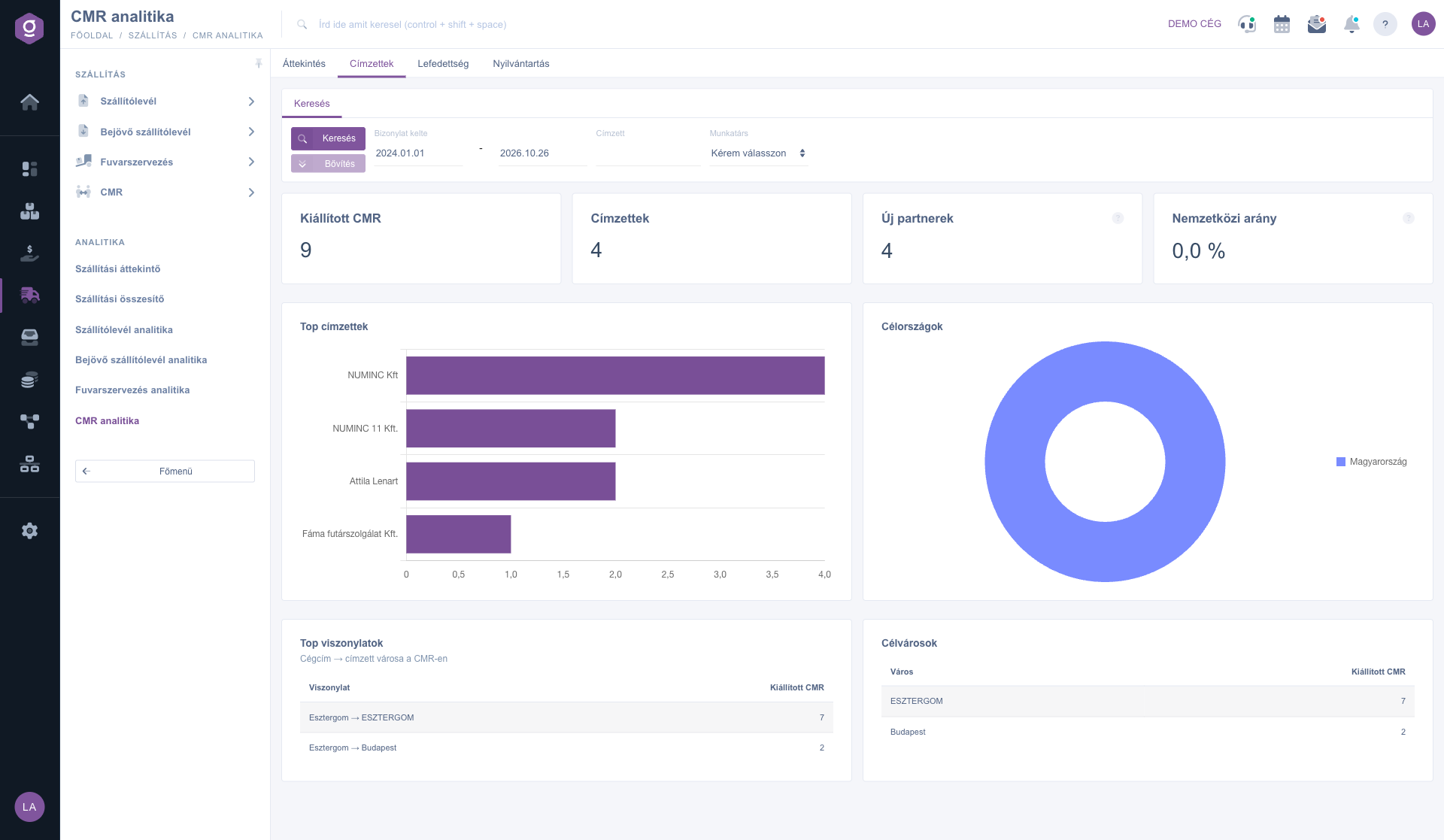
CMR analytics – Consignees tab (Címzettek)

4. Coverage

The tab checks the document background of the CMRs. The Linked documents chart shows for what percentage of the CMRs a Delivery note, Transport, Invoice and Order exists in the same business process. The CMRs without links are issued CMRs whose process contains none of the listed documents; it is worth linking or checking them afterwards. The Foreign shipments without CMR is the compliance watch list: issued invoices whose shipping address is not in the country of the company and the process has no CMR. Click the document number in the table below it to open the invoice. The Shipped weight is calculated from the items of the delivery notes linked to the CMR, the Shipped value from the linked invoices, and the carriers chart shows the carriers of the transports in the same process as the CMR.
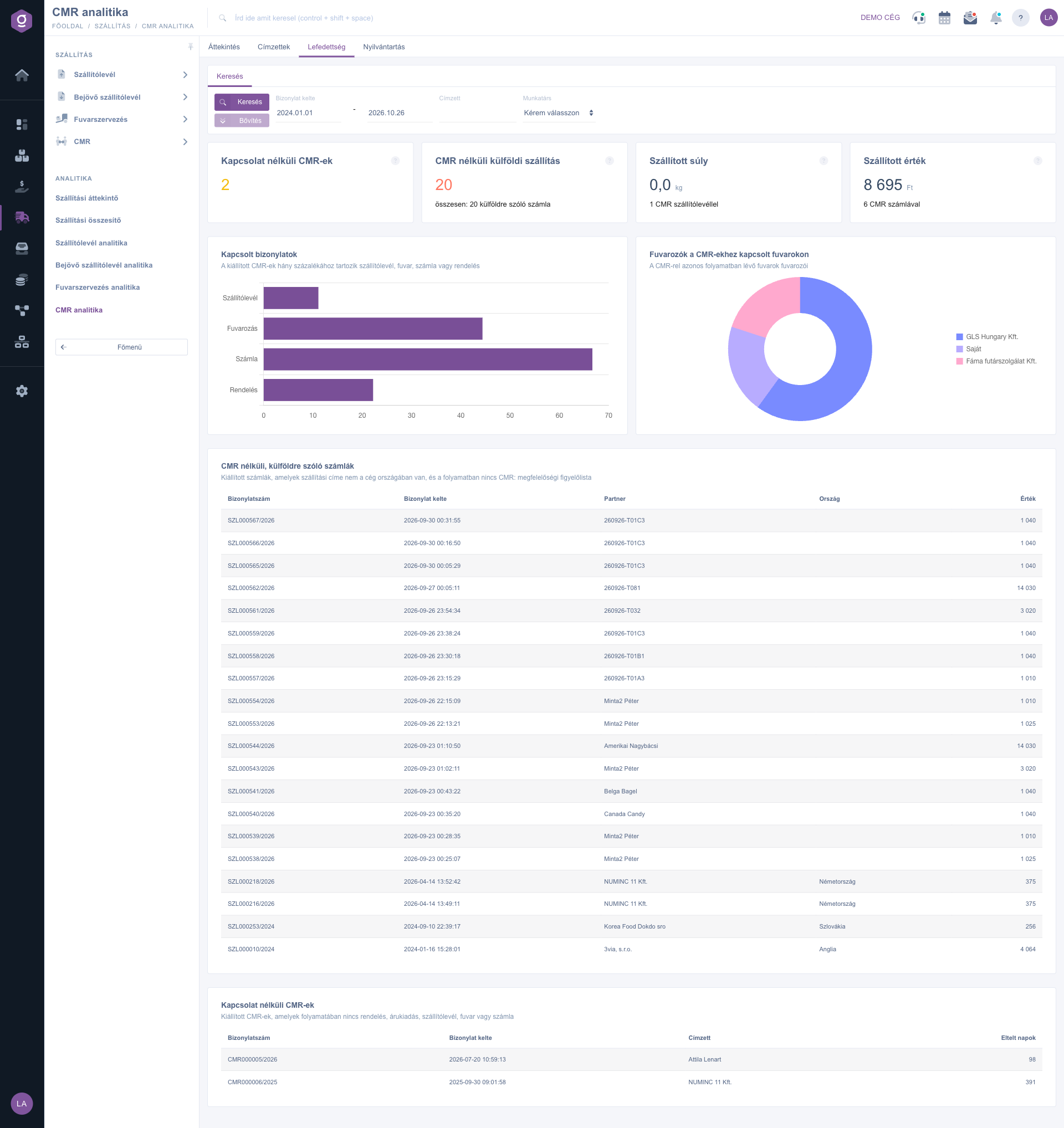
CMR analytics – Coverage tab (Lefedettség)

5. Register

The Numbering audit gives per year the used and the last serial number, the number of deleted documents, the number of Missing serial numbers and the missing numbers (the first 15). A number is missing if it is completely absent from the range, for example CMR000006/2026 follows CMR000004/2026: this can indicate a permanently deleted document, so it is important at an audit. The Age of the drafts chart (within 7 days, 8–30 days, over 30 days) and the Oldest drafts table show the unfinished CMRs. Below them you find the colleagues and the Creation time (weekday x hour) heatmap. The numbering audit and the age of drafts do not depend on the period.
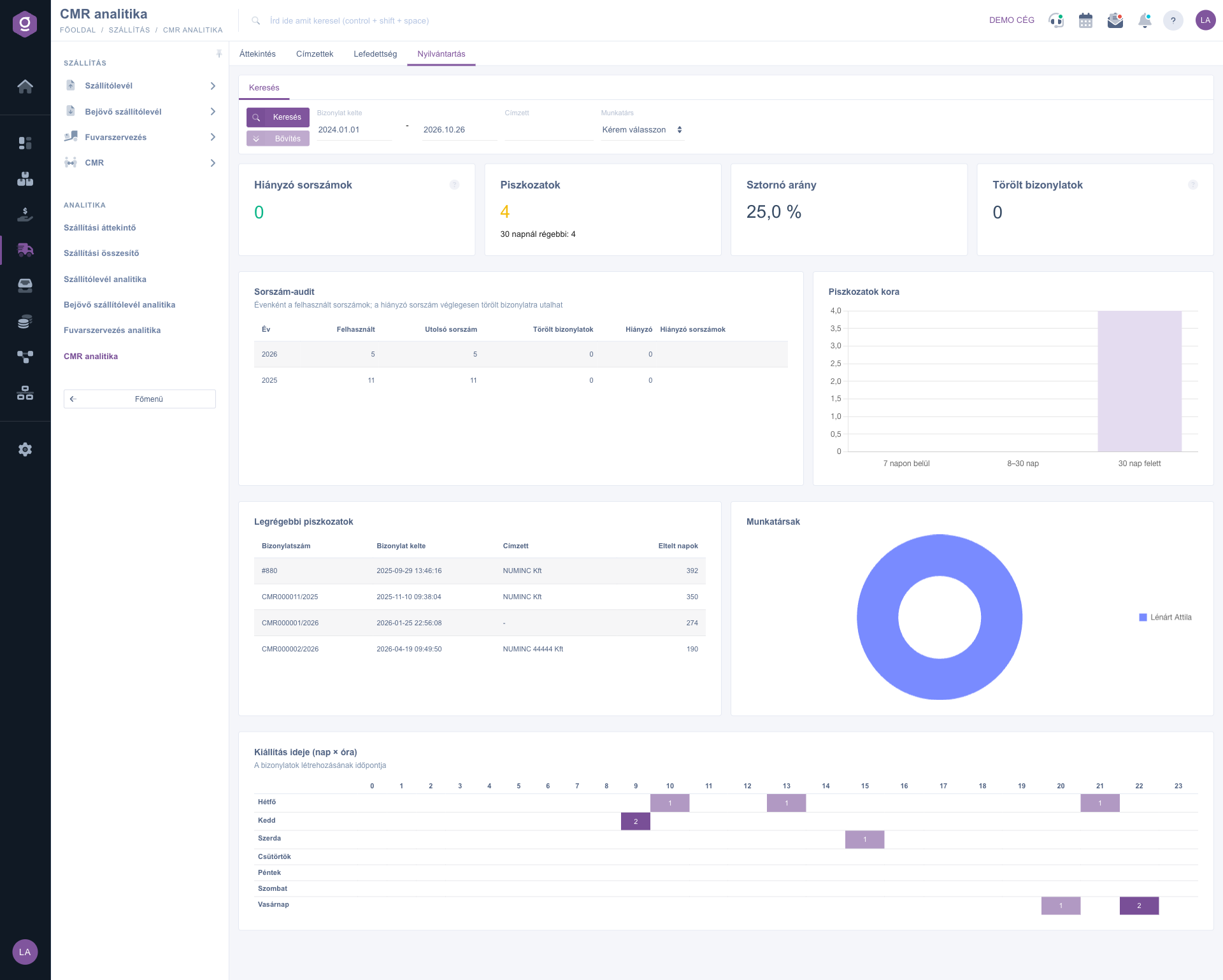
CMR analytics – Register tab (Nyilvántartás)

Tip


Before closing the month open the Coverage tab and go through the Foreign shipments without CMR table. If for example a delivery to Germany has no CMR, you can add the consignment note before a customer complaint or a check.


You can read about issuing a CMR in the CMR list guide, and the whole logistics picture is given by the Logistics overview.

Field reference

The elements of the Search tab and their meaning:

Field / ElementRequiredDescription
Document date (from – to)The date of issuing the CMR. By default 1 January of the current year and today.
ConsigneeA part of the company name of the consignee partner. Left empty, all consignees are shown.
EmployeeThe colleague who issued the CMR. The Please choose row means all colleagues.
Search buttonReloads the active tab with the given filters.

The meaning of the main indicators:

IndicatorWhat it showsHow it is calculated
Printed CMRThe ratio of the printed ones among the issued CMRs.CMRs printed at least once / issued CMRs.
CMRs without linksCMRs without any other document.The process has no Order, Goods issue, Delivery note, Transport or Invoice.
Foreign shipments without CMRInvoices to foreign countries without CMR.Issued invoice whose shipping address differs from the country of the default address of the company, and the process has no CMR.
Shipped weightThe weight of the goods shipped with the CMRs in kg.The quantity of the items of the linked delivery notes multiplied by the gross weight of the product; only where the weight is set.
Missing serial numbersThe numbers missing from the numbering.The numbers not present in the yearly range (from 1 to the last serial number).

Frequently asked questions

The menu item appears if both the Shipping summary module and the CMR module are assigned to you. If one of them is missing, ask your administrator to check your module assignment.

The system compares the country of the shipping address of the invoice with the country of the default address of the company. If another country is on the invoice at the shipping address, it considers it foreign, even if the goods actually went to a domestic address. In that case correct the shipping address of the partner. It can also happen that you created the CMR independently of the invoice, without a link: then the system cannot see the connection, so it is worth issuing the CMR from the invoice or from the delivery note.

The CMR has no items or price of its own, so these values come only from the delivery notes and invoices in the same process. If there is no linked delivery note or invoice for the CMR, or the weight is not set at the products, the value stays 0. The line below shows for how many CMRs a linked delivery note or invoice existed.

The serial numbers of the CMRs are continuous. If a number appears neither as an active nor as a deleted document, that document disappeared permanently from the database. It is not necessarily an error, but it is worth clarifying before a check or an audit. The Deleted documents column counts the documents that are deleted but kept their serial number; these are not counted as missing.

Need personalized help?

Don't want to spend hours searching for a solution? Choose the most efficient way: book a personalized, 45-minute online training session dedicated entirely to you. Whether it's a walkthrough of the basics or a detailed setup of a specific module, our expert colleague will guide you through the whole process, step by step.

Don't waste your time - ask for help!
Our goal is to get you using our system as quickly and efficiently as possible. Whether you're completely new to us or stuck on a specific setting, don't hesitate to ask for help!

Logzi warehouse management software

Get in touch with us

Interested in our software? Feel free to write to us!

Need help?

If you can't find the answer and need assistance

Create your account now,
pay later!

Try it free for 3 days, no risk, no obligation!
