On the NTAK programok (NTAK programs) page you add the programs that you must report to NTAK. For each program you enter its type, category, frequency, duration and location.
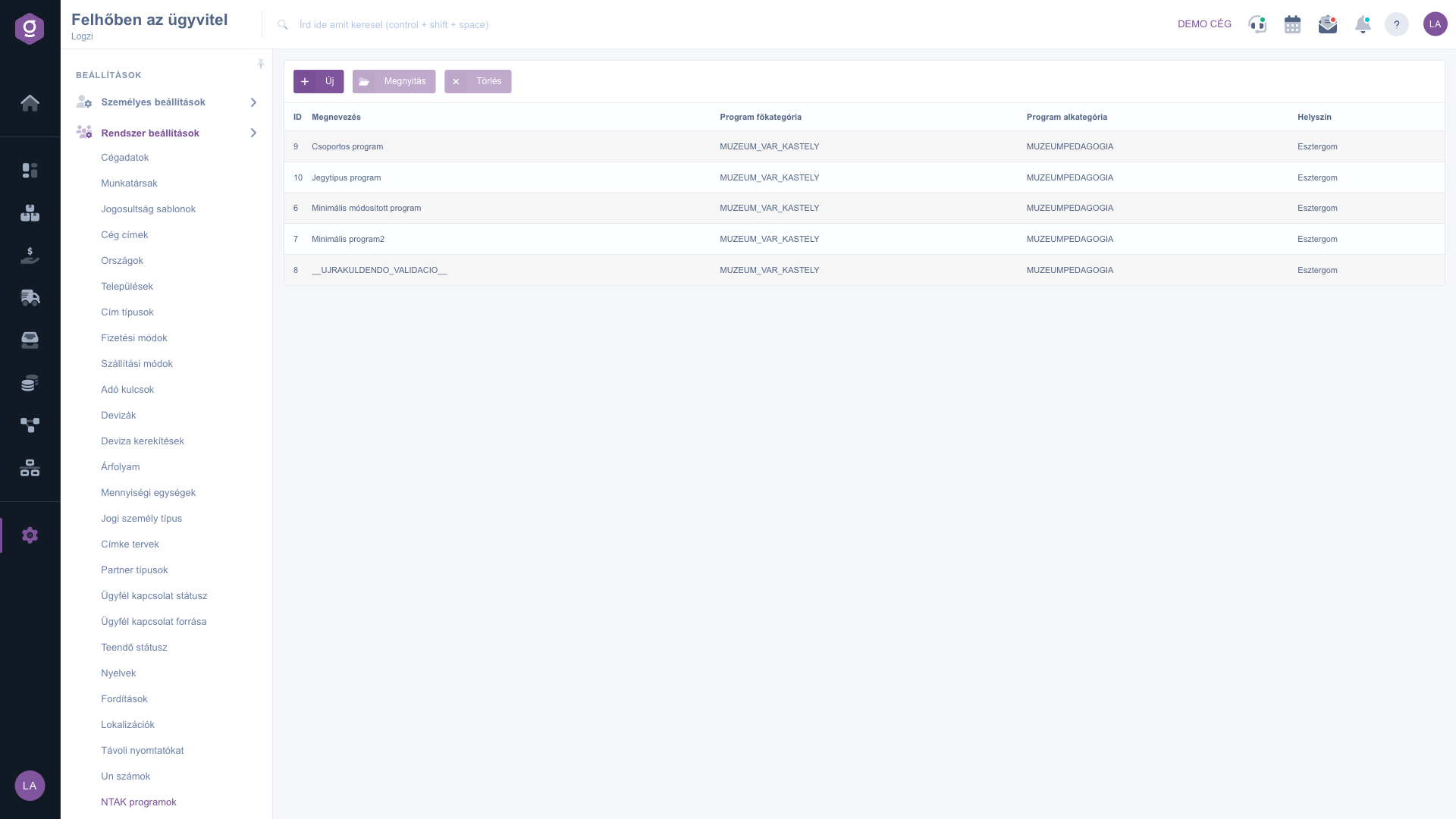
Click Main menu / Settings / System settings / NTAK programok. The menu item and the field names of this page are shown in Hungarian in every language; the English names below are given with the Hungarian label in parentheses. At the top you see the New, Open and Delete buttons, below them the list with the ID, Megnevezés (Name), Program főkategória (Program main category), Program alkategória (Program subcategory) and Helyszín (Location) columns. Click a row to select the program.
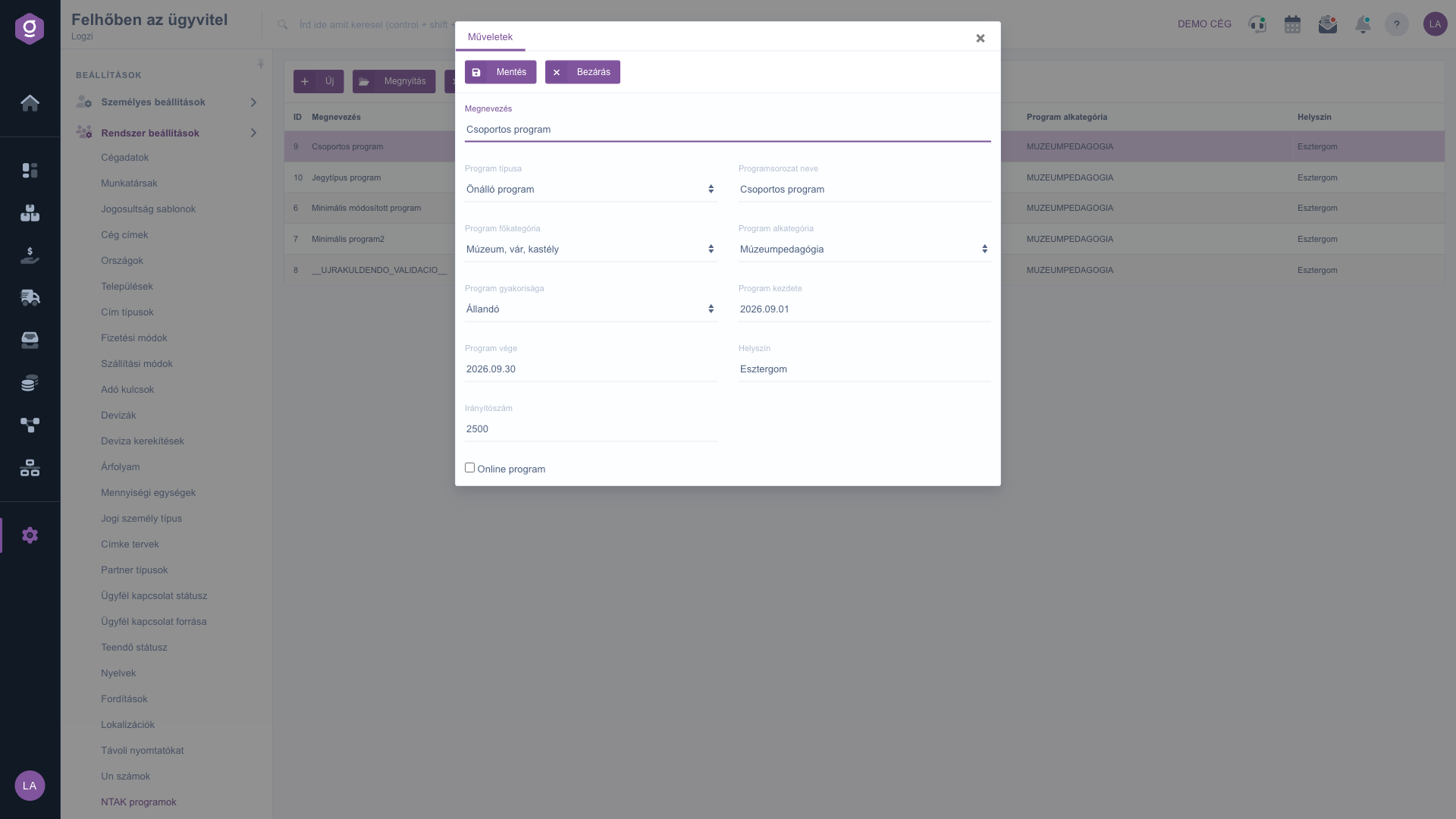
Click New, or select a row and click Open. On the Actions tab of the window that opens, below the Save and Close buttons, enter the Megnevezés (Name), choose the Program típusa (Program type), Program főkategória (Main category), Program alkategória (Subcategory) and Program gyakorisága (Frequency), then fill in Program kezdete (Start), Program vége (End), Helyszín (Location) and Irányítószám (Postal code). For an online program, tick the Online program checkbox. Finally click Save.
Select the row and click Delete. The list of subcategories always follows the selected main category, so choose the main category first.
Fill in the Program főkategória (main category) field first: the subcategory list offers its values only after that.
The fields of the NTAK program form.
| Field | Required | Description |
|---|---|---|
| Megnevezés (Name) | The name of the program shown in the list. | |
| Program típusa (Program type) | Standalone program, Part of a program series or Combined program. | |
| Programsorozat neve (Program series name) | The name of the program series the program is part of. | |
| Program főkategória (Main category) | The main classification of the program, for example Public baths, Zoo or Music and dance events. | |
| Program alkategória (Subcategory) | The subcategory belonging to the main category, for example Concert or Festival. | |
| Program gyakorisága (Frequency) | Permanent, One-off, A few occasions, Seasonal or Regularly recurring. | |
| Program kezdete (Start) | The first day of the program, with a date picker. | |
| Program vége (End) | The last day of the program, with a date picker. | |
| Helyszín (Location) | The location of the program. | |
| Irányítószám (Postal code) | The postal code of the location. | |
| Online program | Tick it if the program takes place online. |
The subcategory depends on the selected main category. Choose the main category first and the list will be filled.
If the program is a member of a larger series, choose this type and enter the name of the series in the Programsorozat neve field.
Tick the Online program checkbox. Depending on the nature of the program, the location and postal code may stay empty.
Use the date picker of the field, which enters the date in the year.month.day format.
The menu item is located under Main menu / Settings / System settings. If you do not see it, your user probably does not have the required permission; ask your administrator to check the settings.
Don't want to spend hours searching for a solution? Choose the most efficient way: book a personalized, 45-minute online training session dedicated entirely to you. Whether it's a walkthrough of the basics or a detailed setup of a specific module, our expert colleague will guide you through the whole process, step by step.
Don't waste your time - ask for help!
Our goal is to get you using our system as quickly and efficiently as possible. Whether you're completely new to us or stuck on a specific setting, don't hesitate to ask for help!
Create your account now,
pay later!


