On the Additional services page you can order services beyond the license, and credit packages. The page has two parts:
Every card shows the price and the Purchase button that puts the item in the cart.
Open the Main menu / Subscription / License / Additional services menu item. At the top the services are shown, below them the cards of the SMS and other credit packages. The screenshots were taken in the Hungarian interface.
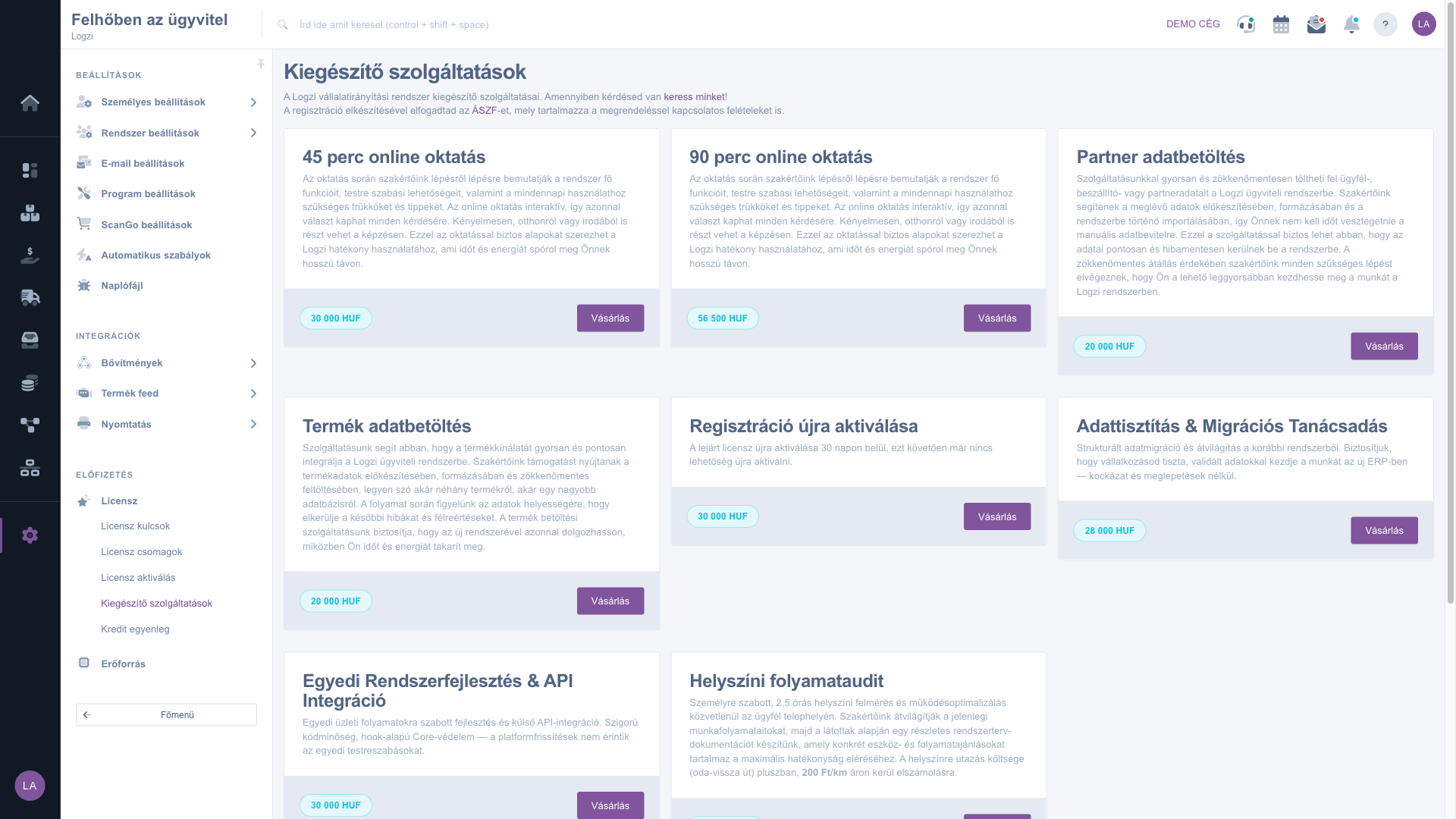
Find the service or credit package you need. The card shows the name, the short description and the price. For credit packages the content is also shown, for example the number of SMS.
Click the Purchase button. The item is put in the cart, where you can check the order and complete the purchase. At the bottom of the page there is a link to the general terms and conditions.
The purchased credit is added to your balance. When you send an SMS, for example, the system deducts the used amount automatically.
It is worth ordering the data loading and data cleaning services at the first implementation, so that your master data (partners, products) enters the system clean.

There is no field to fill in on this page; every card shows the following elements.
| Field | Required | Description |
|---|---|---|
| Name | The name of the service or credit package. The name comes from the product data, so it is shown in Hungarian. | |
| Description | A short description of the item. For a credit package the quantity and the credit type are also shown (for example 100 pcs SMS). | |
| Price | The price of the item in HUF, in the badge of the card. | |
| Purchase | Puts the item in the cart. |
If your registration has expired, you can have it reactivated with this service within 30 days of the expiry. After that period you may need to buy a new license.
The purchased credit is added to your balance. When it is used, for example when sending an SMS, the system deducts the required amount automatically. You see the balance on the Credit balance page.
The names and descriptions of the services and credit packages come from the product data, which cannot be translated in the interface. The buttons and titles are shown in the selected language.
Click the link at the bottom of the page to open the terms and conditions.
The menu item is in the Subscription group of the Settings menu. If you do not see it, you probably do not have permission; ask the administrator to enable access.
Don't want to spend hours searching for a solution? Choose the most efficient way: book a personalized, 45-minute online training session dedicated entirely to you. Whether it's a walkthrough of the basics or a detailed setup of a specific module, our expert colleague will guide you through the whole process, step by step.
Don't waste your time - ask for help!
Our goal is to get you using our system as quickly and efficiently as possible. Whether you're completely new to us or stuck on a specific setting, don't hesitate to ask for help!
Create your account now,
pay later!

