Resource

Learn about the Resource page: here you see the size of the database, runtime environment and storage your system uses, and the monthly fee excluding the license.

Function overview

On the Resource page you see which server resources your system uses. The page has four parts:

  • Summary: a summary of the currently used resources and the settlement payable at the beginning of the month. Here you see the Database, Resource and Storage data and the Total payable monthly fee (excluding the license).
  • Database: the size of the SQL server storing the data, which primarily determines the operation and speed of the system.
  • Linux server: the size of the environment running the system. It needs to be expanded when you work with larger data, PDF, XLSX or other files.
  • Storage: the space for storing files, which typically needs to be expanded when uploading PDF or image files in bulk. Its size automatically increases and decreases.

The currently used package is highlighted in green and gets a button labeled Currently used. The Purchase buttons of the other packages cannot be used on the page: you have to arrange the change with us.

You find the other pages of the subscription in the License keys help page.

Step by step

1. Viewing the current state

Open the Main menu / Subscription / Resource menu item. At the top of the page the Summary shows the used database, resource and storage, and the total monthly fee payable. The screenshots were taken in the Hungarian interface.
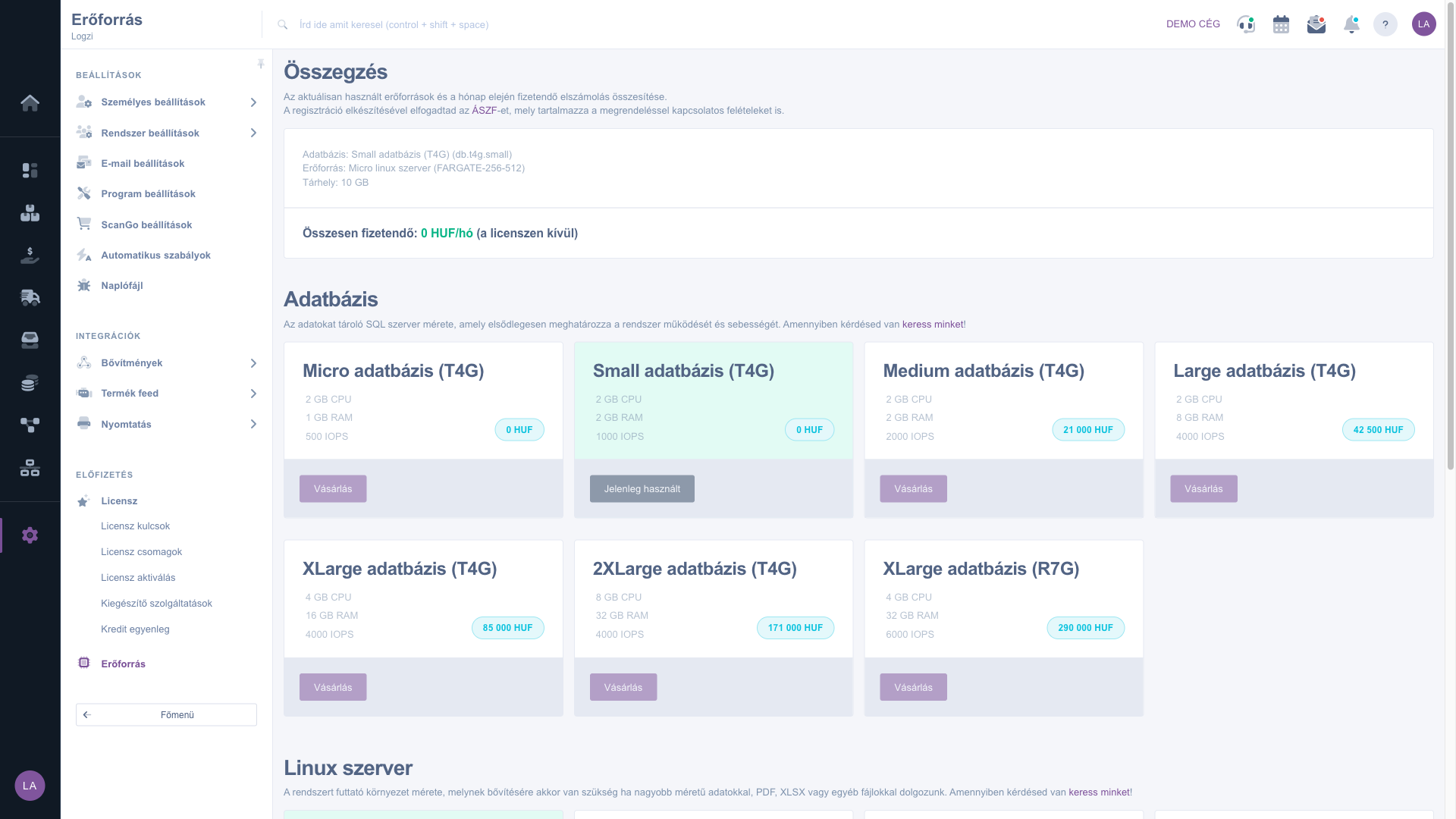
The Resource page with the summary and the packages

2. Comparing the packages

In the Database and Linux server sections cards show the available sizes with their processor, memory and IOPS data and the price. The package in use is highlighted in green.

3. Checking the storage

In the Storage section you see the current size in GB. The storage size increases and decreases automatically, so you usually do not have to change it manually.

4. Requesting a change

If you need a larger or smaller package, the Purchase buttons cannot be used on the page. Click the contact us link in the description of the section and arrange the change with us. The terms related to the order are contained in the Terms and Conditions.

Tip


If the system seems slow, or you work with many PDF and XLSX files, check whether a larger database or runtime environment size would be worthwhile.


Field description

There is no field to fill in on this page; the following data are shown.

FieldRequiredDescription
DatabaseThe name and type of the database in use in the Summary, and in its section the cards of the available sizes.
ResourceThe name and type of the runtime environment (Linux server) in use.
StorageThe size of the storage in use, in GB.
Total payableThe monthly fee in HUF, excluding the license. A summary of the settlement payable at the beginning of the month.
Currently usedThe mark of the currently used package on the card.
PurchaseA button visible on the other packages but not usable on the page: the change has to be arranged with us.

Frequently asked questions

The Purchase buttons cannot be used on the page. Click the contact us link in the description of the section and arrange the change with us.

The sum of the monthly fees of the database, runtime environment and storage in use, excluding the license. The settlement is payable at the beginning of the month.

It needs to be expanded when you work with larger data, PDF, XLSX or other files.

Typically when uploading PDF or image files in bulk. The storage size increases and decreases automatically.

The menu item is in the Subscription group of the main menu. If you do not see it, you probably do not have permission; ask the administrator to enable access.

Need personalized help?

Don't want to spend hours searching for a solution? Choose the most efficient way: book a personalized, 45-minute online training session dedicated entirely to you. Whether it's a walkthrough of the basics or a detailed setup of a specific module, our expert colleague will guide you through the whole process, step by step.

Don't waste your time - ask for help!
Our goal is to get you using our system as quickly and efficiently as possible. Whether you're completely new to us or stuck on a specific setting, don't hesitate to ask for help!

Logzi warehouse management software

Get in touch with us

Interested in our software? Feel free to write to us!

Need help?

If you can't find the answer and need assistance

Create your account now,
pay later!

Try it free for 3 days, no risk, no obligation!
