Cash register machine history document

The document of one cash register day: opening and closing amounts, turnover by payment method, the receipts and invoices of the day, and closing.

Function overview

The Cash register machine history document shows the full picture of one cash day: when the day opened and closed, how much money was in the cash register and the cash desk at opening and closing, the net, VAT and gross value of the turnover, and how the turnover is split between payment methods. At the bottom of the document you also see all receipts (documents with the PZT prefix) and invoices (documents with the SZL prefix) of the day in one table.

  • Header: document number, date, status, cash register, the cash register opening and closing date, the turnover values, the opening and closing amounts.
  • Payment method cards: turnover by Cash, Bank transfer in advance, Cash on delivery, Bank card and Voucher, plus the Total card.
  • Items: the receipts and invoices of the day by document, with payment method and values.
  • Closing: closing the day with or without printing.

The statuses of a cash day: Draft (open day), Closed, Cancellation, Cancelled.

Step by step

1. Opening the document

Click Main menu / Sales / In-store sale / Cash register machine history, select a cash day in the list, then click the Open button on the Actions tab. The header of the document shows the number of the cash day (for example PNZ000058/2026). There are two tabs at the top: Actions and Additional functions.
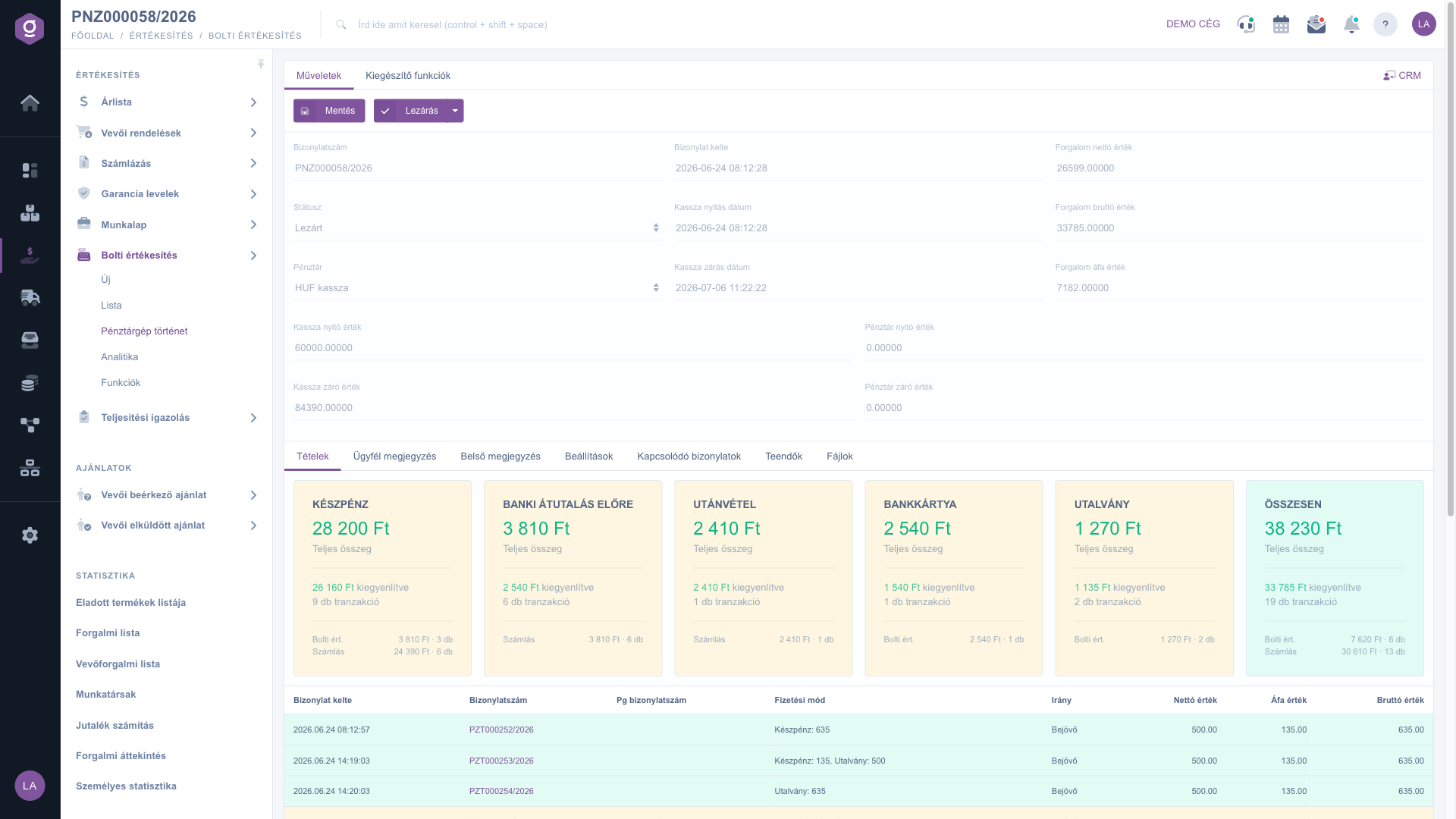
Cash register machine history document – header and payment method cards

2. The header and the payment method cards

In the header, the Document number, the Document date and the Status are read-only. From the Cash register drop-down list you see the cash register, and the Cash register opening date and Cash register closing date fields show the start and end of the day. The Turnover net value, Turnover gross value and Turnover VAT value fields show the turnover of the day, while the Cash register opening amount, Cash register closing amount, Cash desk opening amount and Cash desk closing amount fields show the amounts in the cash register and in the cash desk. Below the values you find the payment method cards: each shows the Total amount, the settled amount and the number of transactions, and at the bottom the split into Retail sale (receipts) and Invoiced (invoices). The Total card sums up the whole day.

3. The items table

On the Items tab every receipt (PZT prefix) and invoice (SZL prefix) of the day is shown in its own row, with the columns Document date, Document number, PG Document number, Payment method (with the amount), Direction, and Net value, VAT value, Gross value. By clicking the document number you can open the given receipt or invoice. A row with a negative value shows a return or a cancellation.
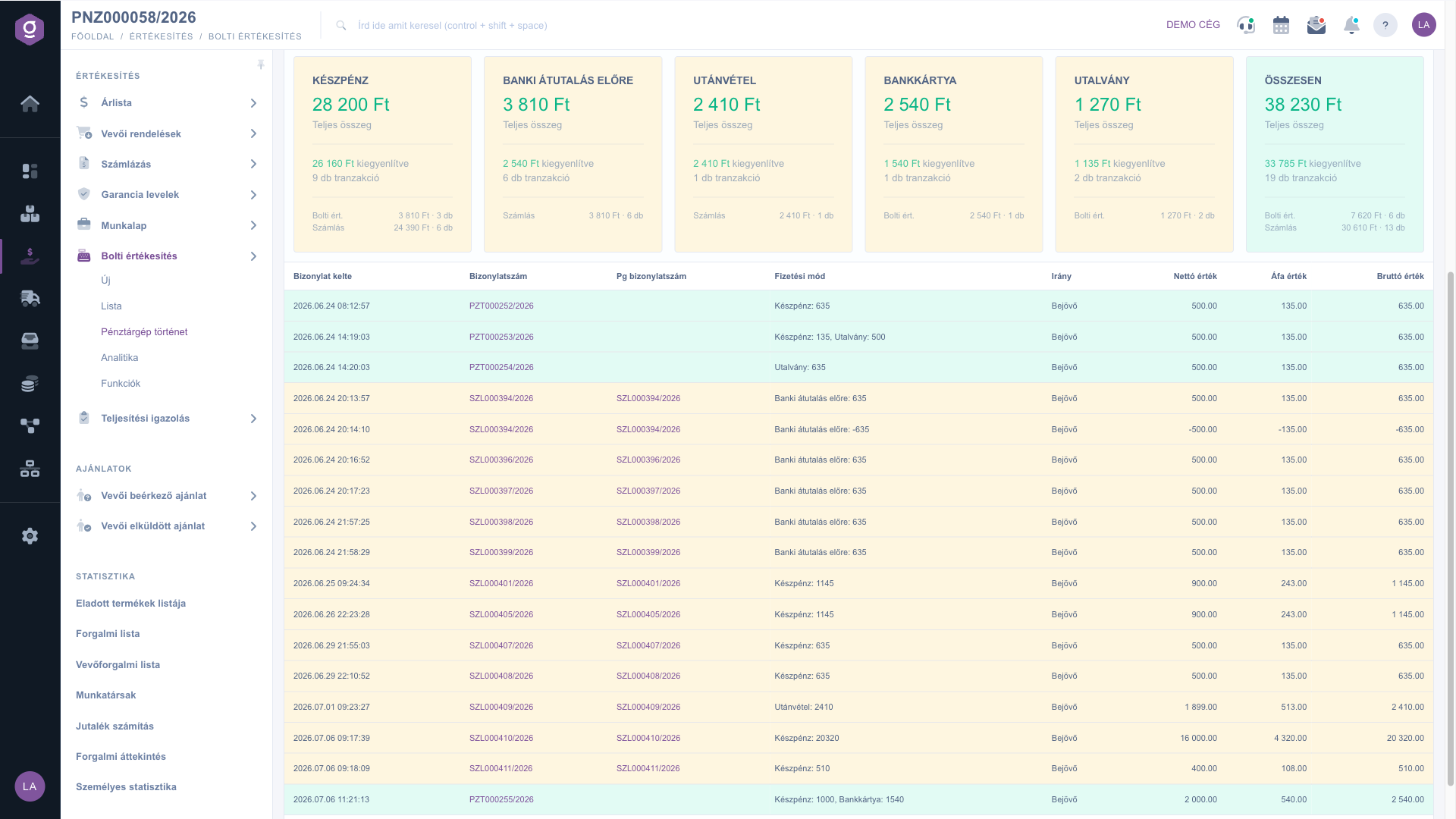
Receipts and invoices of the day in the items table

The other tabs: Customer comment, Internal comment, Settings (Project, Job number, Department number), Related documents, Tasks and Files. The Related documents tab has the columns Document type, Document number, Issuing employee, Document date and Action; if there is no related document, the text The list is empty is shown.
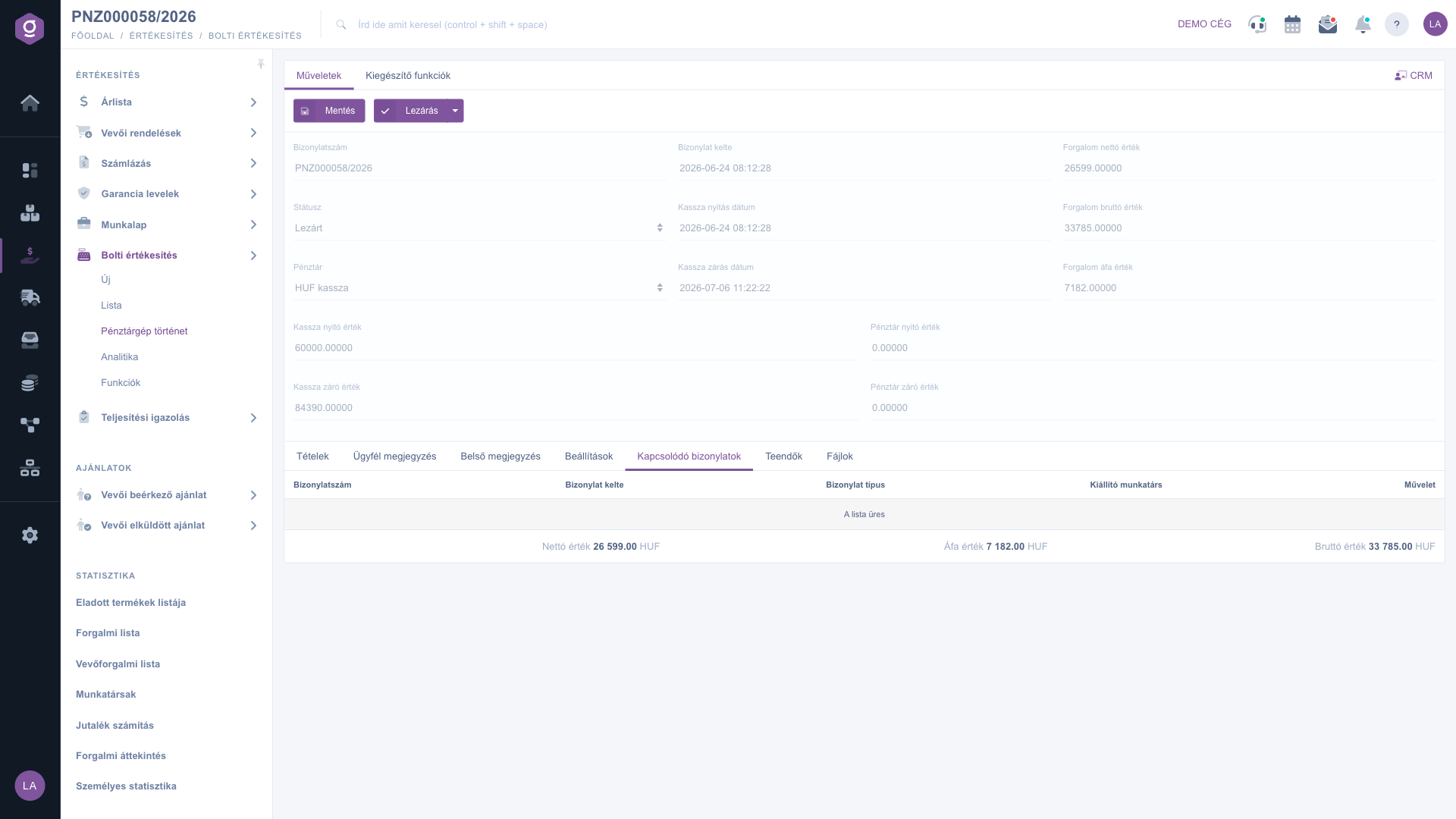
Related documents tab

4. Saving and closing

With the Save button you store the changes of the document. From the arrow next to the Close button you can choose between two options: Close and print or Close. When closing, the document is finalized and cannot be modified afterwards. On the Additional functions tab you can record a new task (New task) for the document.
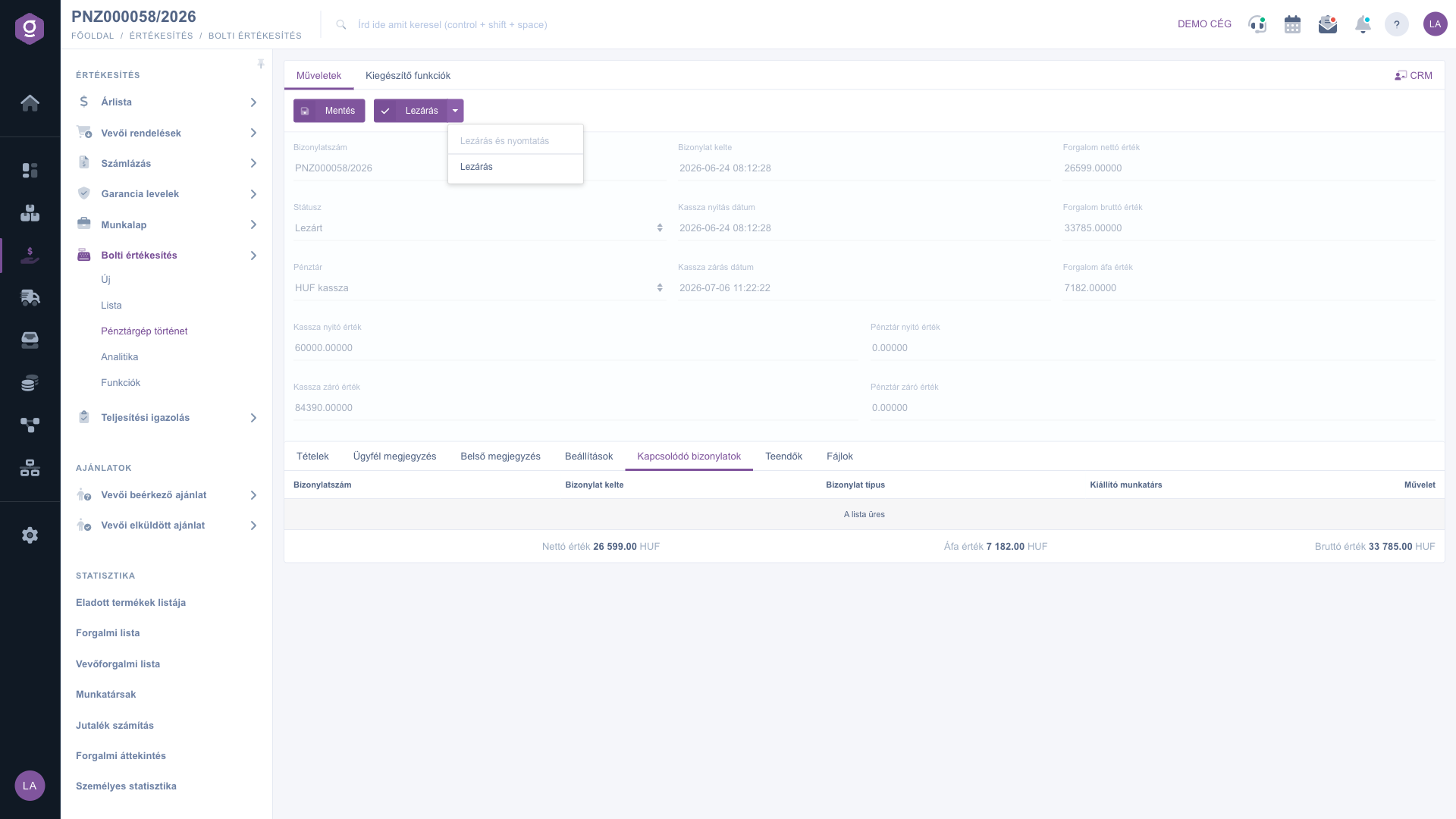
The Close menu
The Close menu

Tip


Before closing, compare the Cash register closing amount with the Cash amount on the payment method cards and with the Cash register opening amount: if you see a difference, correct the value before closing the day, because after closing it can no longer be modified.


The list of cash days is described in the Cash register machine history list. Opening and closing the day and cash movements are covered by Retail sale functions, the receipts of the day by the In-store sale list, and recording a new sale by the In-store sale document.

Field descriptions

The fields of the document header:

Field / ElementRequiredDescription
Document numberThe number of the cash day document (with the PNZ prefix); read-only.
Document dateThe time the document was created; read-only.
StatusThe status of the cash day (Draft, Closed, Cancellation, Cancelled); read-only.
Cash registerThe cash register the day belongs to (for example HUF kassza).
Cash register opening dateThe time the cash day was opened.
Cash register closing dateThe time the cash day was closed.
Turnover net valueThe net value of the turnover of the day.
Turnover gross valueThe gross value of the turnover of the day.
Turnover VAT valueThe VAT content of the turnover of the day.
Cash register opening amountThe amount in the cash register at opening.
Cash register closing amountThe amount recorded in the cash register at closing.
Cash desk opening amountThe amount in the cash desk at opening.
Cash desk closing amountThe amount recorded in the cash desk at closing.

The columns of the items table:

ColumnDescription
Document dateThe date and time of the receipt or invoice.
Document numberThe document number of the receipt (PZT) or invoice (SZL); opens on click.
PG Document numberThe document number given by the cash register machine, if there is one; otherwise empty.
Payment methodThe payment method or methods with the amount (for example Cash: 635).
DirectionThe direction of the money movement, typically Incoming.
Net valueThe net value of the document.
VAT valueThe VAT value of the document.
Gross valueThe gross value of the document.

The Total card adds up the other payment methods; the Retail sale and Invoiced lines show how much came from receipts and how much from invoices.

Frequently asked questions

The menu item only appears if the in-store sale permission is assigned to your user and your package includes the module. If you cannot find it under Main menu / Sales / In-store sale, ask your system administrator to check your permissions.

The Cash register opening amount and the Cash register closing amount show the amount in the cash register, while the Cash desk opening amount and the Cash desk closing amount show the amount in the cash desk. The values entered at day opening and day closing are stored in these fields.

A row with a negative value is the counterpart of a reversed or cancelled document, which offsets the original row. In that case the original and the opposite row together give zero.

No. When closing, the document is finalized and cannot be modified afterwards. So before clicking Close, check the opening and closing amounts and the turnover by payment method.

Only documents linked to the cash day appear on this tab. If there are none, the text The list is empty is shown. The receipts and invoices of the day are not here but on the Items tab.

Need personalized help?

Don't want to spend hours searching for a solution? Choose the most efficient way: book a personalized, 45-minute online training session dedicated entirely to you. Whether it's a walkthrough of the basics or a detailed setup of a specific module, our expert colleague will guide you through the whole process, step by step.

Don't waste your time - ask for help!
Our goal is to get you using our system as quickly and efficiently as possible. Whether you're completely new to us or stuck on a specific setting, don't hesitate to ask for help!

Logzi warehouse management software

Get in touch with us

Interested in our software? Feel free to write to us!

Need help?

If you can't find the answer and need assistance

Create your account now,
pay later!

Try it free for 3 days, no risk, no obligation!
