The Csomagpiac extension creates the connection between Logzi and the courier service that is needed for creating parcel labels and passing shipping data.
Go to the Main menu / Integrations / Extensions / Install new extension menu item. Among the cards, find the Csomagpiac card and click its Install button.
On the page that opens, under the Actions tab you see three basic fields: the API name field is prefilled (in the form “… integráció”), the Csomagpiac type is selected in the Type field, and the Active field is set to Yes. You can rewrite the API name, for example if you install several extensions of the same integration.
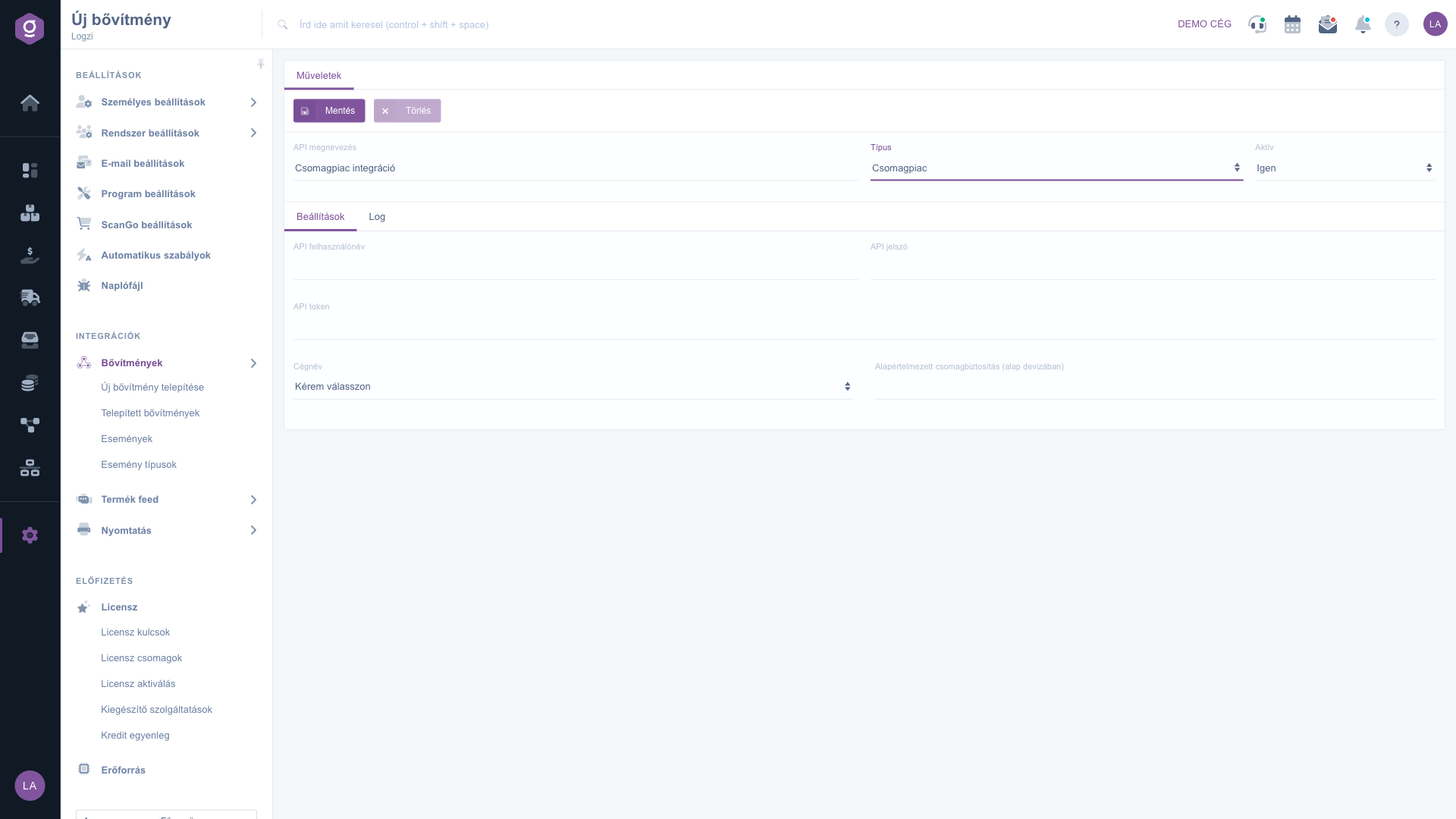
On the Settings tab, enter the access data received from the courier service, then select your sender company in the Company name field. Filling in the further fields (for example parcel insurance, label size, pickup address, default colleague) is optional and can be changed at any time. You can find the description of each field below.
Click the Save button. Saving also performs the installation: after a successful operation the message “A bővítmény telepítése/módosítása sikerült!” (“The extension was installed/modified successfully!”) appears, which you can close with the Rendben (OK) button; this popup text is shown in Hungarian in every language. If the access data are wrong, the provider may reject the connection; in that case correct the data and save again.
If you receive the warning “A bővítmény telepítése nem sikerült vagy már telepítve van!” (“The extension could not be installed or is already installed!”, shown in Hungarian), or you are unsure about the result, open the Log tab of the extension: there you see the status, date and message of the events in chronological order. You can also open the installed extension later from the Installed extensions list.
You receive the access data (username, password, keys) from the courier service; treat them as confidential and do not share them with others.

| Field / Element | Required | Description |
|---|---|---|
| API name | The name of the extension in the Installed extensions list. Prefilled at installation in the form “… integráció”; you can freely rewrite it, so you can tell apart several extensions of the same type. | |
| Type | The type of the extension; it is preset based on the selected card (Csomagpiac). | |
| Active | With Yes the extension works, with No it is paused. The default at installation is Yes. | |
| API username | Access data received from Csomagpiac; copy it exactly, without extra spaces. | |
| API password | Access data received from Csomagpiac; copy it exactly, without extra spaces. | |
| API token | Access data received from Csomagpiac; copy it exactly, without extra spaces. | |
| Company name | Select which of your company records appears as the sender in the data passed to the provider. | |
| Default parcel insurance (in base currency) | The insured amount recorded by default for parcels, in your company base currency. |
The appearance of the menu item depends on your permissions. If you cannot see it, ask the administrator to check your permissions.
This message is shown in Hungarian in every language and means that the extension could not be installed or is already installed. Either the data entered are wrong, or you already have this extension installed with the same settings. Check the Installed extensions list and the Log tab of the extension; if necessary, correct the data and save again.
You receive them from the provider based on your contract with Csomagpiac (customer service, customer portal or sales contact). Logzi cannot request data on your behalf.
Open the extension on the Installed extensions page and use the Delete button, or set the Active field to No if you only want to pause it.
Don't want to spend hours searching for a solution? Choose the most efficient way: book a personalized, 45-minute online training session dedicated entirely to you. Whether it's a walkthrough of the basics or a detailed setup of a specific module, our expert colleague will guide you through the whole process, step by step.
Don't waste your time - ask for help!
Our goal is to get you using our system as quickly and efficiently as possible. Whether you're completely new to us or stuck on a specific setting, don't hesitate to ask for help!
Create your account now,
pay later!

